The new Autodesk Revit 2027 is a deal for Building Information Modeling. Building Information Modeling is getting better. As architecture and engineering and construction projects get complicated and more people are working together Building Information Modeling professionals need software that can handle a lot of information make it easier for people to work together automate tasks that are done again and help get projects done faster.
Autodesk Revit 2027 is coming out at a time when architecture and engineering and construction industry is changing a lot.
The architecture and engineering and construction industry is changing to:
- Intelligent BIM workflows
- Cloud-connected collaboration
- Data-driven project management
- Automation and AI-assisted processes
- Faster digital construction delivery
Modern Building Information Modeling projects that have many people working together at the time. Architects and structural engineers and mechanical engineers and contractors and Building Information Modeling managers all need to work together to make sure projects are done correctly and on time.
Autodesk Revit 2027 does not just make changes it makes the whole Building Information Modeling process better from the start of a project to the end. This is where Autodesk Revit 2027 makes a difference.
The latest release focuses heavily on:
- Improved software performance
- Smarter automation tools
- Better collaboration workflows
- Enhanced documentation efficiency
- Smoother handling of large-scale projects
- Improved user experience
What’s New in Revit 2027
Why Revit 2027 is Important for BIM Professionals
Autodesk Revit 2027 helps with many of the problems that Building Information Modeling professionals have by making the workflow better and faster. By making things faster and easier to work Autodesk Revit 2027 helps teams work better and get more done.
Today Building Information Modeling professionals have common problems when working on projects including:
- Slow model performance
- Large and complex project files
- Time-consuming documentation
- Coordination issues between disciplines
- Heavy linked models
- Multi-user collaboration challenges
What is New in Revit 2027?
Revit 2027 helps Building Information Modeling professionals. It does this with tools and features. The Autodesk Assistant and MCP work together. They make Revit 2027 more useful, for BIM professionals.
Autodesk Revit 2027 is focused on making the software faster and smarter and easier to use when working on complicated projects.
Running mixed-version environments is standard practice when managing large asset portfolios across different lifecycle stages. If your current deliverables are anchored to the previous release cycle, review our comprehensive feature breakdown to optimize your workflows.
Revit 2026 Features & Major UpdatesSome of the important new things, in Autodesk Revit 2027 include:
- Performance optimization
- Smarter automation features
- Enhanced cloud collaboration
- Improved documentation workflows
- Better user experience
- More stable work-sharing environments
Faster Performance
Revit 2027 has several enhancements that will make project coordination and coordination of BIM workflows even more efficient. The release is dedicated to the improvement of the software’s speed, intelligence, and collaboration, as well as the user experience of large and complex projects. The following are some of the most notable changes in Revit 2027:
- Faster model loading
- Better synchronization speeds
- Improved linked model handling
- Reduced lag in views and sheets
- More stable work-sharing performance
- Better responsiveness during documentation
These improvements are especially beneficial for projects such as High-rise towers, Airports, Hospitals, Commercial developments, Infrastructure projects, etc. Every minute counts when working with BIM on complex projects every day.
Deploy an agile production team specializing in multi-disciplinary modeling, clash detection, and high-maturity documentation schedules. Maximize your project delivery speed while significantly reducing project overheads.
Explore BIM ServicesAI Inside Revit 2027
It seemed like science fiction for a long time, automatic buildings, quick designs, and autonomous BIM processes in AI in the AEC industry. The approach of Autodesk Revit 2027 is more realistic. That really makes it practical.
Revit 2027 is not about replacing BIM professionals. It helps eliminate problems that slow down teams. The new Autodesk Assistant features in Revit 2027 work speed up repetitive tasks and help navigate projects.
Fresh market data from Q2 2026 highlights a massive acceleration in technology deployment on jobsites, revealing that 38% of contractors now report a measurable business impact from active AI integration, more than doubling the 17% adoption rate recorded just a year ago.
This shift makes the feature feel practical rather than experimental. It is less about “AI replacing designers” and more about:
- Saving production time
- Reducing repetitive work
- Improving workflow continuity
- Helping teams work smarter inside Revit
Despite the intense industry focus on artificial intelligence, a global survey of 1,000 AEC professionals by ASCE and Bluebeam reveals that only 27% of firms currently use AI in their daily operations. However, 94% of those early adopters plan to scale their usage in 2026 as workflows shift away from paper-based design phases.
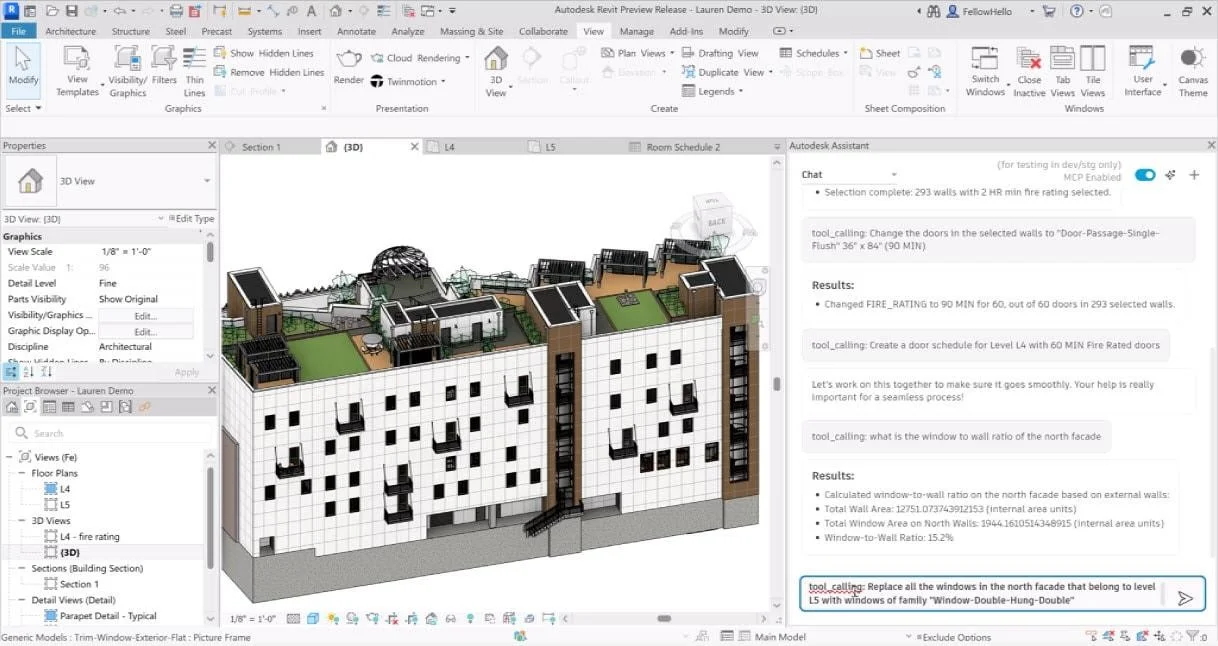
Autodesk assistant in Revit 2027 | © AUTODESK
Autodesk Assistant is Now Part of the Workflow
One of the biggest changes in Revit 2027 is how Autodesk Assistant is integrated directly into the software environment.
Earlier, BIM professionals often had to:
- Search online for workflow help
- Watch tutorials during production
- Navigate through multiple menus
- Manually locate tools and commands
Now, assistance feels more connected to the actual project workflow. This creates a smoother experience because users spend less time leaving the software to solve small workflow issues.
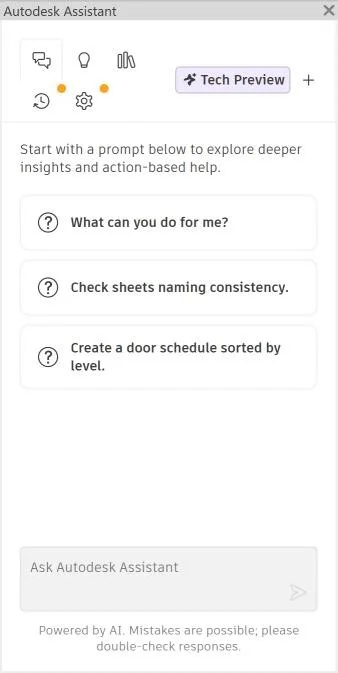
Users can interact with the assistant too:
- Access project information faster
- Find commands quickly
- Get workflow guidance
- Navigate tools more efficiently
- Organize project data inside Revit
Autodesk Assistant in Revit 2027 | © AUTODESK
What is MCP?
MCP stands for Model Context Protocol. It helps AI tools understand what is happening in a BIM project. Earlier AI systems could answer questions. They did not really get the context of a model.
They could not recognize:
- Project relationships
- Model structures
- Documentation connections
- Active BIM workflows
Revit 2027 changes this by allowing AI-assisted tools to interact more intelligently with the project environment itself.
That means the software can better understand:
- Project data
- Views and sheets
- Model information
- Workflow structures
- Documentation context
Real world application testing of REVIT 2027’s new Model Context Protocol (MCP) server highlights a massive upgrade in data extraction. External AI systems can now read live model elements, geometric values, and parameters directly from an open project file in real time, completely eliminating the need to manually export static schedules or screenshots.
Explore this Autodesk DevCon Keynote on Agentic AI to see live demonstrations of the Model Context Protocol (MCP) server running natively inside the Revit environment.
AI Focuses on Reducing Workflow Friction
One reason these features feel practical is because Autodesk is not treating AI as a dramatic replacement for BIM professionals. Instead, the focus is on reducing the small repetitive actions that consume time every day.
For example, BIM teams regularly spend hours:
- Searching through project browsers
- Managing documentation data
- Organizing views and sheets
- Reviewing schedules
- Coordinating information between disciplines
These tasks are necessary, but they slow down production significantly over long project cycles. Revit 2027 uses AI and MCP-powered workflows to make these interactions feel more fluid and less manual.
Collaboration in Revit 2027
Projects are no longer handled by a single office working on local servers. Even project sizes of just a few hundred people are often distributed and work from various places. The software must let architects, structural consultants, electrical and plumbing engineers, contractors and Building Information Modelling coordinators talk to each other throughout the project lifecycle.
This is why the new features, in Autodesk Revit 2027 are important. Autodesk is working hard to make it easier for teams to work together on projects, which can be really complicated with models, updates and information being shared. Autodesk Revit 2027 is helping teams to work together easily.
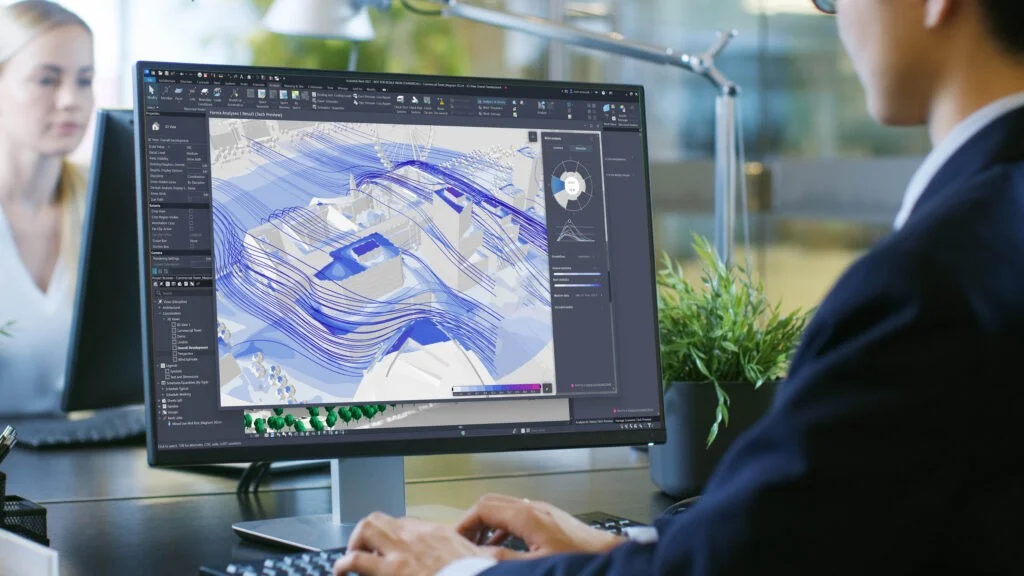
Smarter way for coordination in Revit 2027 | © AUTODESK
Shared Models Feel More Stable During Active Projects
One of the biggest frustrations in collaborative BIM environments has always been work-sharing interruptions.
On large projects, teams frequently deal with:
- Long synchronization times
- Central model delays
- Update conflicts
- Linked model coordination issues
Revit 2027 makes it better by making sure that everyone can work together smoothly. The updates are easier to do. Teams can make changes throughout the day without any problems.
Autodesk Construction Cloud Integration
Revit is no longer just a design tool sitting separately from construction workflows. It is increasingly becoming part of a larger connected ecosystem where project information flows continuously between teams.
Revit 2027 strengthens this connection by supporting better coordination between:
- Model updates
- Documentation workflows
- Issue tracking
- Shared project environments
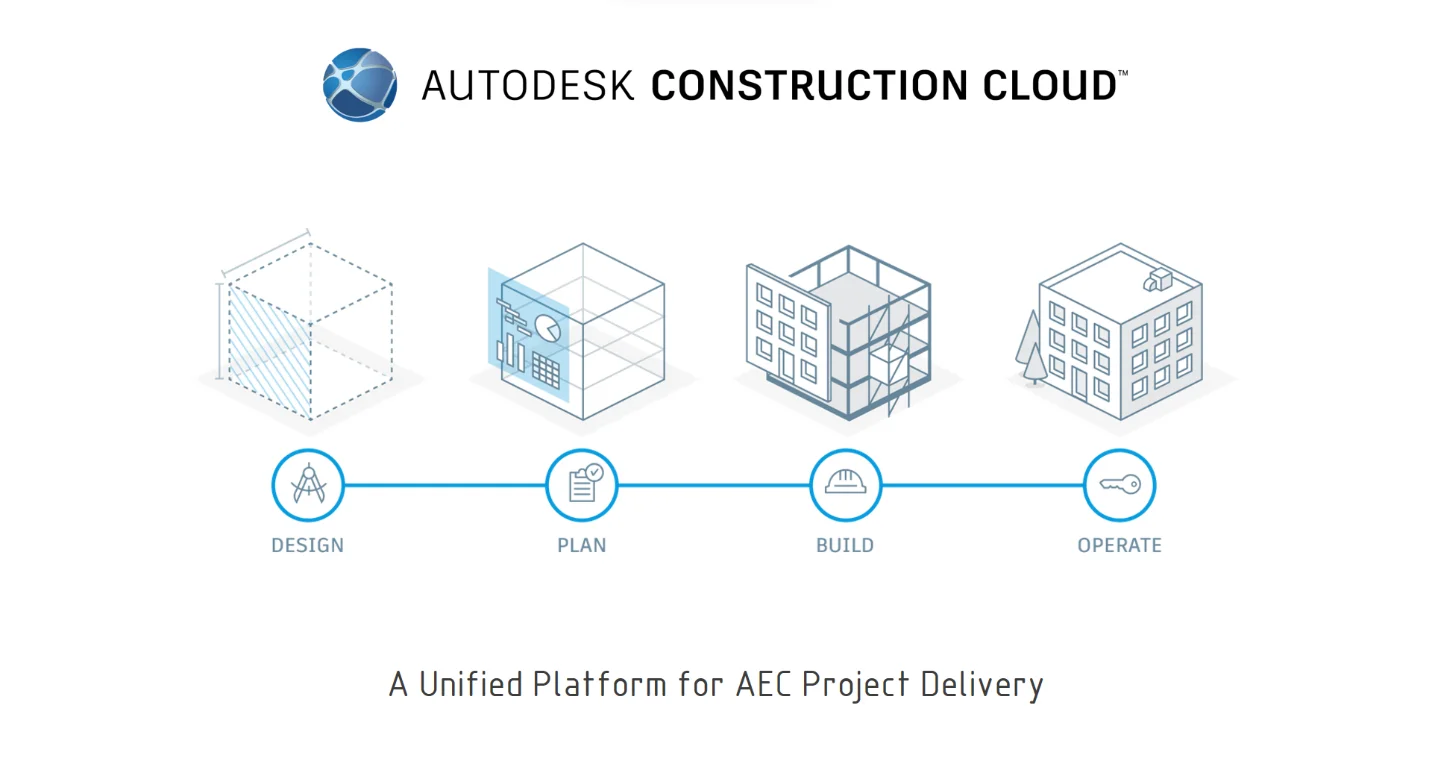
Autodesk Construction Cloud | © AUTODESK
Documentation Workflows in Revit 2027 Feel Far More Efficient
In most BIM projects, modeling usually gets the attention — but documentation is where teams spend a huge portion of their actual production time. And honestly, this is where workflows often become exhausting.
Large projects involve constant management of:
- Sheets
- Schedules
- Tags
- Annotations
- View placements
- Revision updates
As detailed above, Autodesk Revit 2027 does not bring in game-changing new documentation tools, but it does enhance the entire experience for using documentation-heavy workflows. It is a process that feels faster, cleaner, and less frustrating during the daily production process.
Today, sheets, schedules, model updates, and coordination workflows are constantly connected across disciplines. A small design revision can affect multiple views, sheets, and project deliverables almost immediately.
Revit 2027 improves this interconnected workflow by helping documentation environments feel:
- More organized
- Easier to manage
- Better coordinated across teams
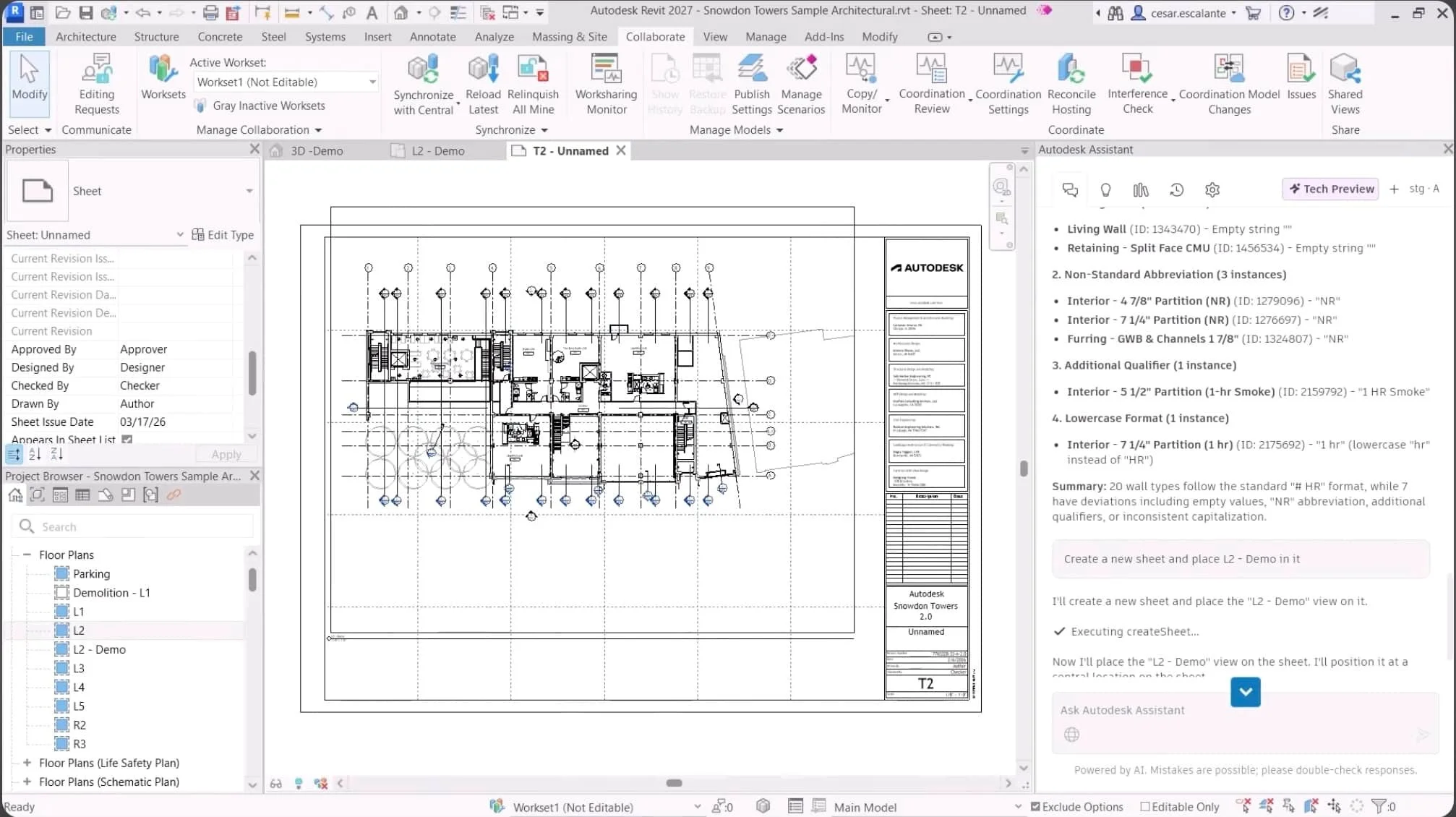
AI assistant has made documentation easier | © AUTODESK
Sheet Management Feels Less Stressful
Revit 2027 improves this experience by making sheet workflows feel more responsive and easier to navigate. Now feel smoother during production.
Tasks such as:
- Opening sheets
- Switching between views
- Managing layouts
- Updating documentation sets
Schedule Handling Feels More Responsive
One of the most crucial components of BIM is the scheduling, as it directly links project data to the model. Revit 2027 enhances schedule responsiveness to create a more stable and efficient data heavy work experience. But on large projects schedules can be hard to manage because of:
- Heavy datasets
- Slow updates
- Complex filtering
- Repetitive revisions
Instead of fighting the software during documentation phases, teams can move through project information more fluidly. This becomes especially valuable in projects where schedules constantly evolve alongside design and coordination updates.
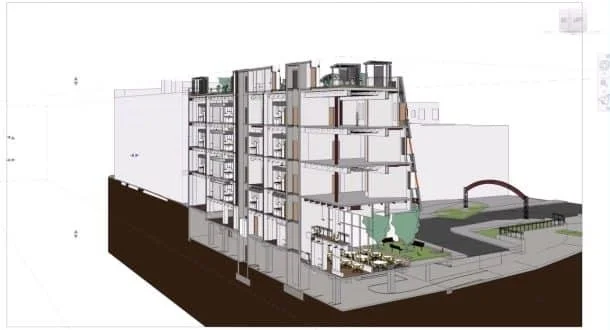
Modernized experience with REVIT 2027 | © AUTODESK
Annotation Workflows Feel Cleaner
One of the most repetitive parts of documentation is annotation management. Revit 2027 improves annotation workflows by making project navigation and documentation handling feel more organized overall. Users spend less time manually adjusting workflows and more time focusing on project accuracy.
Throughout production, BIM teams repeatedly handle:
- Tags
- Dimensions
- Notes
- Symbols
- Detail references
These tasks may seem small, but across large documentation packages, they consume huge amounts of time. And honestly, this creates a much less exhausting documentation environment during long production cycles.
The Small Changes in Revit 2027 Users Will Notice Every Day
Not all major software enhancements are based on a huge new feature. In some cases, it is the little things that users encounter day after day that make all the difference: the clicks they do not need to make, the menus that are not so difficult to navigate, or the times when the software just seems less tiring to work in. Believe me, this is one of the features of Autodesk Revit 2027 that is not talked about enough.
This release does not completely redesign the interface or radically change how BIM professional’s work. Instead, Autodesk has focused on refining the everyday user experience in ways that feel subtle individually but extremely valuable over time.
Working Inside Revit Feels Less Cluttered
One issue many BIM professionals face during long production sessions is interface fatigue.
Large projects already demand constant attention:
- Coordinating views
- Managing sheets
- Reviewing model data
- Switching between disciplines
- Handling revisions
When the software gets too cluttered it slows down your work. Revit 2027 makes the workspace cleaner and easier to use. Access to tools feels more organized, moving between workflows is smoother and project environments feel less overwhelming during production.
Project Browsing Feels More Natural
On large BIM projects, users constantly move between:
- Views
- Sheets
- Schedules
- Families
- Linked models
- Documentation sets
Earlier workflows could sometimes feel slow or fragmented because navigating through project data required too much manual searching. Revit 2027 improves this experience by making project organization feel more intuitive. Moving through complex project structures now feels more fluid, especially in documentation-heavy environments.
This becomes surprisingly important during long coordination sessions where users repeatedly switch between multiple project areas throughout the day.
Fewer Interruptions During Production Work
One thing Revit 2027 quietly improves is workflow rhythm.
In older BIM environments, production often felt interrupted by:
- Small navigation delays
- Repeated menu searching
- Unnecessary clicks
- Constant window switching
Individually, these moments may seem minor. All these small things can be added up. Cause problems with a big project. Revit 2027 makes it easier by making the process smoother and less boring. BIM models are becoming the place for all project information, linked to design, coordination, construction and operations all in one process.
Why Revit 2027 Matters for Large BIM Projects
An area where Autodesk Revit 2027 makes a difference is in the execution of large Building Information Modelling projects. Many small residential projects could be easily handled in any BIM environment. But once projects become larger and more complex, software limitations begin appearing very quickly. Teams start dealing with:
- Heavy central files
- Slow navigation
- Coordination bottlenecks
- Massive, linked models
- Delayed synchronization
- Large documentation packages
And honestly, these challenges become exhausting during long production cycles. That is why many of the improvements in Revit 2027 feel especially valuable for enterprise-scale BIM workflows.
Transform raw field data, point clouds, and laser scans into highly optimized, parametric REVIT models built directly to your strict execution standards. Eliminate execution friction before your construction team mobilizes on-site.
Explore Scan to BIM ServicesLarge Models Feel More Manageable
The software is more stable to work with complex BIM environments, particularly in multi-disciplinary projects where linked files constantly interact with each other. The new version of Revit 2027 is enhanced for working on large projects by providing a faster working environment during:
- View navigation
- Model coordination
- Synchronization
- Documentation workflows
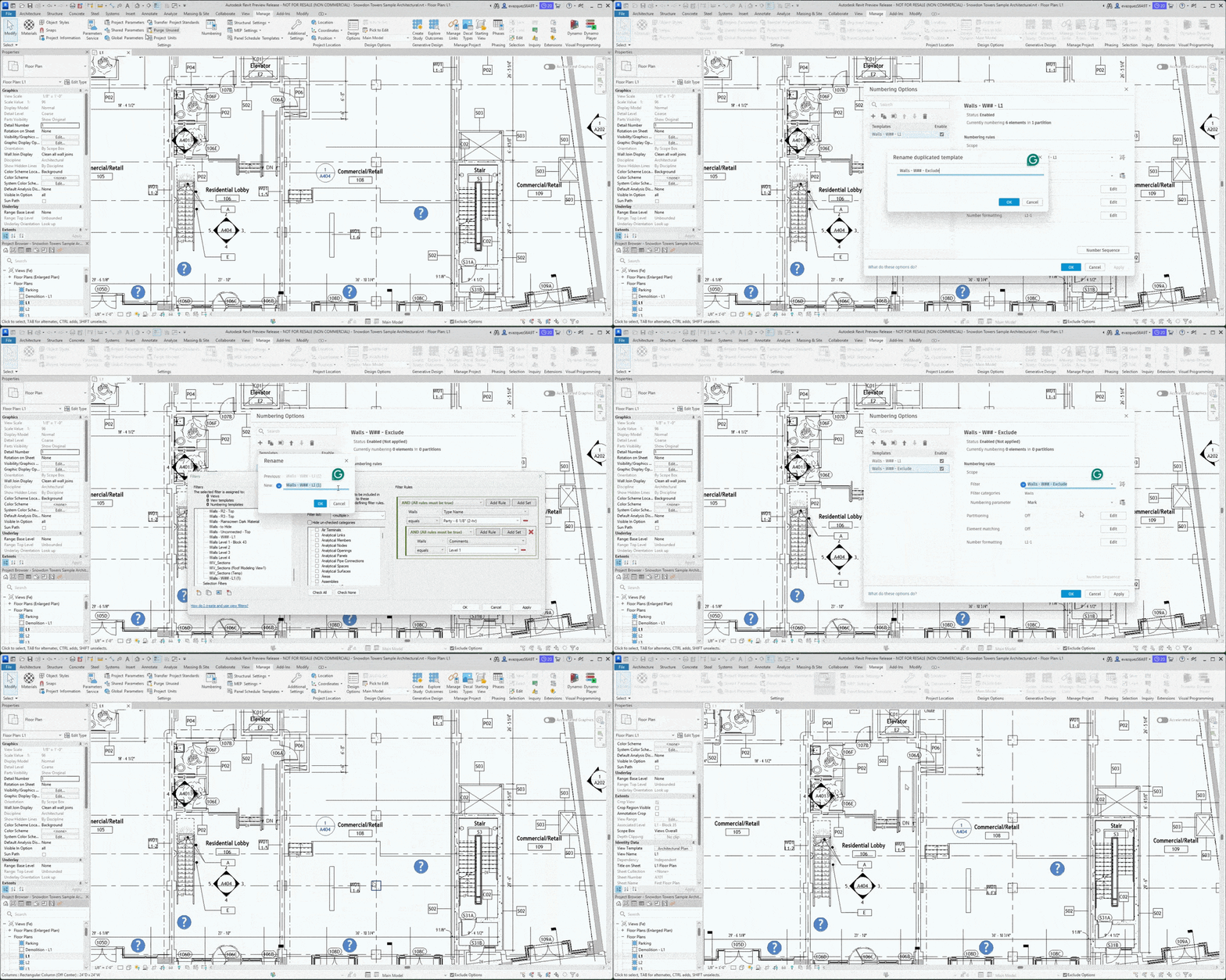
Rule based numbering feature | © AUTODESK
Multidisciplinary Coordination Becomes Smoother
Revit 2027 enhances the loading, updating and management of linked models between disciplines. This creates a much smoother coordination experience during active project development.
In older workflows, coordination between these disciplines could often slow down because of:
- Heavy linked files
- Slow updates
- Shared model conflicts
- Navigation Lag
Documentation at Scale Feels More Stable
Revit 2027 improves the experience of handling large documentation environments by making workflows feel:
- Faster
- Cleaner
- More organized
- Less interrupted
Even small improvements in sheet navigation and schedule responsiveness create noticeable productivity gains when multiplied across large projects.
Better Stability Improves Team Productivity
Autodesk has worked hard to ensure the workflow continuity thanks to which Revit 2027 feels more refined in this respect. This makes the BIM production process much less stressful when working under high time constraints.
The software now handles:
- Shared project environments
- Large, linked files
- Multi-user coordination
- Dense BIM models
Revit 2027 and the Future of Intelligent BIM
A few of the updates in Autodesk Revit 2027 are improvements to existing workflows, but there is also a more significant message: what will be the future of BIM? The AEC industry is making an incremental shift towards a BIM industry, one that is not simply a design tool.
Autodesk is getting ready for the future with Revit 2027. Revit 2027 seems like a step towards the generation of Building Information Modelling workflows, rather than just a small update.
BIM Models Are Becoming Data Hubs
One major shift happening in the industry is how BIM models are evolving into data-rich environments rather than simple 3D representations. This growing dependence on structured project information is changing how teams interact with BIM software.
Revit 2027 supports this transition by improving how project information is organized, accessed, and connected throughout workflows
Today, a model is expected to contain:
- Design information
- Material data
- Coordination updates
- Construction details
- Asset information
- Operational data
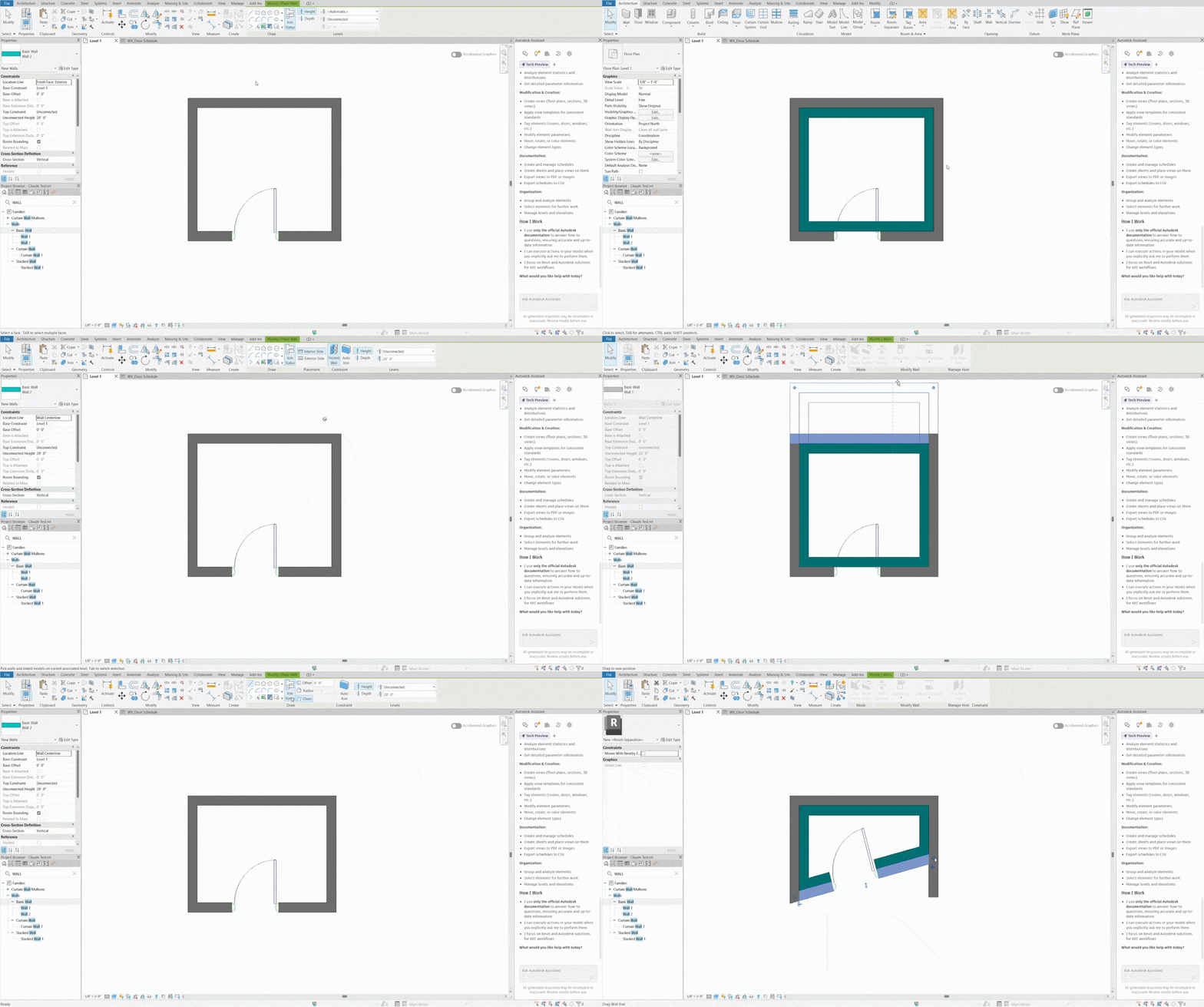
Hosting walls on walls in REVIT 2027 | © AUTODESK
Digital Construction is Becoming More Connected
Collaborative projects will result in disconnected workflows that slow down and rob efficiencies. Revit 2027 acknowledges this change by enhancing connected project workflows and better BIM to cloud-based coordination integration. Several things will impact the future of BIM:
- Shared data environments
- Real-time project visibility
- Faster coordination cycles
- Better information flows between teams
Revit 2027 Feels Like a Transition Point
When you look at the picture Revit 2027 does not seem like just another update. It feels like a move towards the generation of Building Information Modelling workflows. The software is slowly changing into something:
- A smarter coordination platform
- A connected project environment
- A data-aware BIM ecosystem
- A more intelligent digital construction tool
And while this transformation is still ongoing, Revit 2027 gives a very clear indication of where the future of BIM is headed next.
Conclusion
With Revit 2027, Autodesk has transcended the concept of a bold new software release to a more nuanced evolution of the way today’s BIM teams can work. Rather than just introducing new products and new tools, Autodesk has enhanced the entire production process in ways that make it faster, smoother, and more integrated.
Reducing workflow friction is a top priority for Revit 2027, with enhanced performance in large projects alongside smarter AI-driven workflows via MCP tools and Autodesk Assistant. Things like synchronization, linked model coordination, documentation management, and cloud collaboration now seem more stable and efficient – particularly when it comes to complex, multidisciplinary projects.
Where is the catch? The advantage of this release is its usability. The enhancements will not only be for demonstrations, but for use in the day-to-day creation of BIM.
Architects and engineers can now spend less time on technical interruptions and more on design, coordination, and project delivery, while BIM managers and coordination teams can now spend less time coordinating with different design and construction teams and more on project delivery.
But Revit 2027 also serves as a good baseline of the direction that intelligent BIM workflows may take in the future. The move towards context-aware AI tools is a testament to the progressive nature of BIM software, extending beyond its modeling capabilities to a more integrated and data-driven project environment. However, using AI to optimize work is not enough for Autodesk to lose control; they are still giving workers the control they deserve, and they are using AI as a tool to do so.
In general, on balance, Revit 2027 is more refined, more grown up, much more representative of today’s building world. It may not be as dramatic a release as Autodesk has ever released, but it is still a release, nonetheless.


