Building Information Modeling workflows will not be done independently in 2026 but will be done in collaboration with other architects and engineers. Today, there are common tools and projects that professionals from many fields work on simultaneously.
But as coordination becomes more advanced, one important question continues to shape BIM strategies across projects.
The important question at hand is whether teams should consider using Federated Building Information Modeling or pursue a transition to a fully Integrated Building Information Modeling workflow.
Initially, it may seem that the two primary methods are alike, but understanding their control and flexibility can help BIM teams feel assured in selecting the best approach for their project needs.
And that difference affects:
- Collaboration efficiency
- Clash detection workflows.
- Model ownership
- File performance
- Construction coordination
In this article, we will explore how both systems work and why many BIM teams in 2026 are now adopting a balanced mix of federated and integrated workflows, fostering confidence in evolving industry standards.
Many AEC professionals use “federated” and “integrated” interchangeably, they shouldn’t.
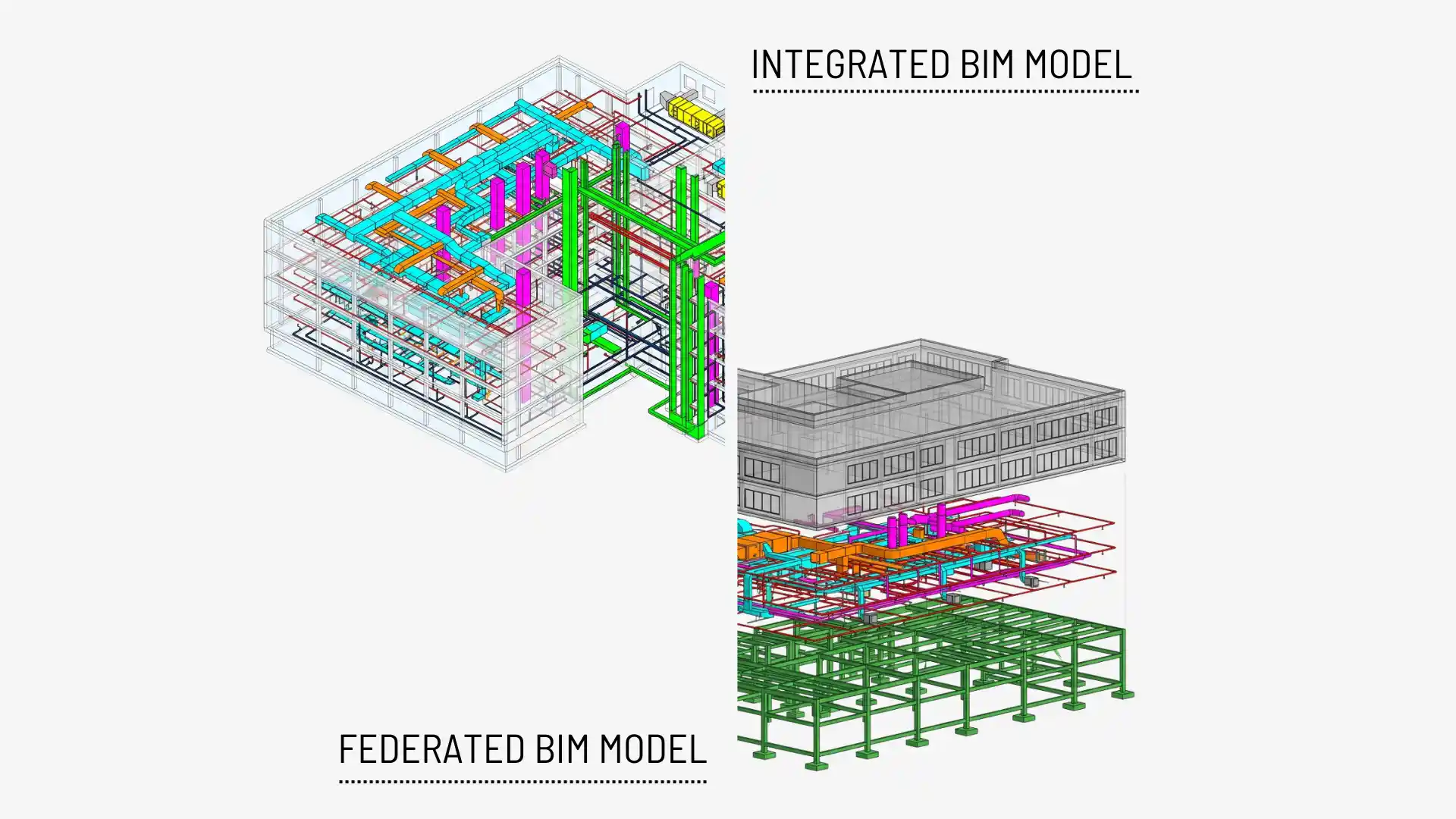
Federated means separate discipline models, linked for coordination, each team keeping ownership. Integrated means one connected data environment with shared responsibility. Same goal (coordination), fundamentally different control structures, and under ISO 19650, the distinction is contractual, not academic.

Federated vs Integrated Models
Understanding the Difference: It is Not Just About Files
It is essential to remember that federated models and integrated models are not just about different file setups. Before comparing the two workflows, it is important to remember that federated and integrated BIM models are not just about different file setups. They are all about connected environments and real-time collaboration, urging BIM practitioners to harness these capabilities to complete projects efficiently.
What is a Federated BIM Model?
A federated Building Information Modeling model is created by linking discipline-specific models together while keeping them as separate files. This means that each person can still work on their part of the Building Information Modeling model. But each discipline keeps ownership and control over its model.
This means:
- Architects manage their own model.
- Structural engineers keep separate structural files.
- MEP consultants work independently on services.
These files are then combined for:
- Coordination meetings
- Clash detection
- Construction reviews
- Project visualization
Federation is not a preference. ISO 19650 mandates it.
Under ISO 19650, delivery teams are contractually required to propose a Federation Strategy as part of their BIM Execution Plan (BEP). The strategy must define how the information model will be broken down into manageable “information containers”, one per discipline, per functional breakdown, per spatial breakdown.
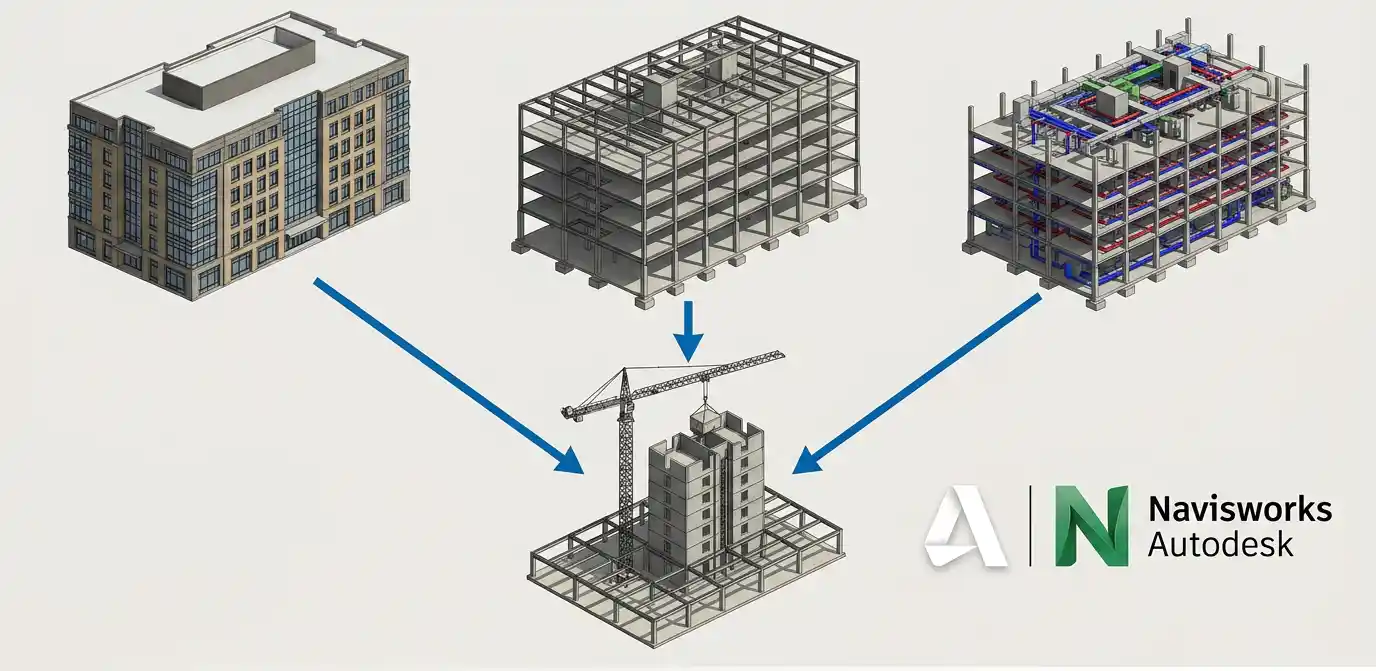
Federated Model in Navisworks
Why Federated Models Became Industry Standard
Federated workflows have become popular because they allow teams to collaborate without forcing everyone to adopt a single heavy model. For large projects in particular, separating models reduces complexity and makes daily work more manageable.
This approach supports:
- Better file performance
- Easier updates
- Parallel workflows
- Clear discipline responsibility
Key Advantages of Federated Models
Federated BIM workflows are still widely preferred because they provide flexibility. This makes federated workflows practical for projects involving multiple consultants across various locations.
Some major advantages include:
- Easier handling of large-scale projects
- Lower risk of file corruption
- Better discipline-level control
- Faster model loading and performance
- Independent updates without affecting all teams at once.
Common Challenges in Federated Workflows
Although Federated is flexible, it still poses coordination issues for teams developing BIM projects. Sometimes, conflicts are not due to the model being incorrect in the Building Information Modeling model, but to infrequent synchronization of the model between teams. There is a multi-stakeholder process that is still disjointed.
Because teams are working separately:
- Model versions may become outdated.
- Shared coordinates can shift.
- Linked files may break.
- Coordination depends heavily on scheduled updates.
What is an Integrated BIM Model?
An integrated BIM model creates a more connected project environment where disciplines work within a highly coordinated ecosystem.
Instead of running as isolated linked models, project information becomes more centralized and interconnected.
This approach is becoming increasingly common through:
- Cloud-based BIM platforms
- Common Data Environments (CDEs)
- Digital twin systems
- Integrated Project Delivery (IPD) workflows
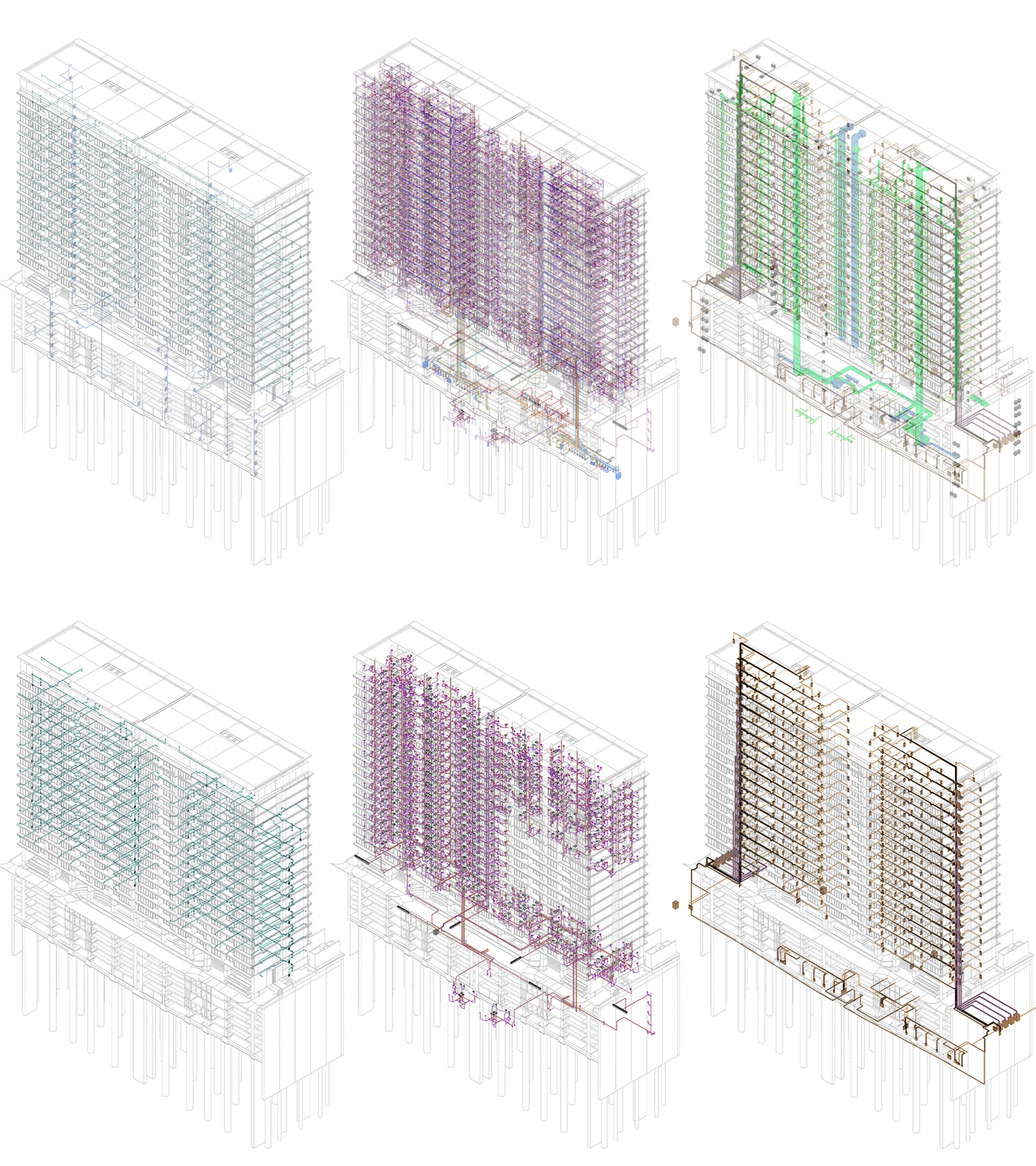
Integrated BIM Models on Revit
There is an increasing preference for integrated models. In 2026, many more projects involving structures such as hospitals, airports, and high-rise towers are using them, for which real-time data and rapid decision-making are key.
Decision-making will need to be accelerated in today’s projects, while real-time coordination is needed. Integrated BIM environments support this level of connectivity much more effectively. Today’s BIM workflows are no longer about geometry; they involve:
- Live project data
- Facility information
- Construction sequencing
- Asset management
- Operational analytics
Cloud has moved from “adoption trend” to “default environment.”
The NBS Digital Construction Report 2025 (15th edition, published 15 October 2025, based on 550+ industry professionals) documents that 80% of respondents now use cloud computing to collaborate on models, specifications and project documents, an 11-point jump in just two years. Even more decisively, 77% now regard a Common Data Environment (CDE) as the most effective way to exchange large amounts of information.
Benefits of Integrated Models
Improved visibility and collaboration throughout the project lifecycle with integrated workflows. Teams can detect issues earlier because information updates across the ecosystem are more dynamic.
Some major advantages include:
- Faster coordination between disciplines
- Better data consistency
- Improved real-time collaboration.
- Easier access to project-wide information
- Stronger support for digital twins and automation
Common Challenges in Integrated Workflows
Without proper management, integrated systems can become difficult to control on exceptionally large projects. However, integration also introduces complexity. More connectivity also means more responsibility.
Because everything is intricately connected:
- File environments become heavier.
- Teams become more interdependent.
- BIM standards must be stricter.
- Workflow errors can change multiple disciplines quickly.
Federated vs Integrated Models
Although the two types of workflows – federated and integrated – aim to improve collaboration, coordination, and project efficiency, they differ in their approaches. For federated models, discipline, independence, and coordinated interaction are emphasized, while for integrated models, real-time connectivity and shared project environments are emphasized.
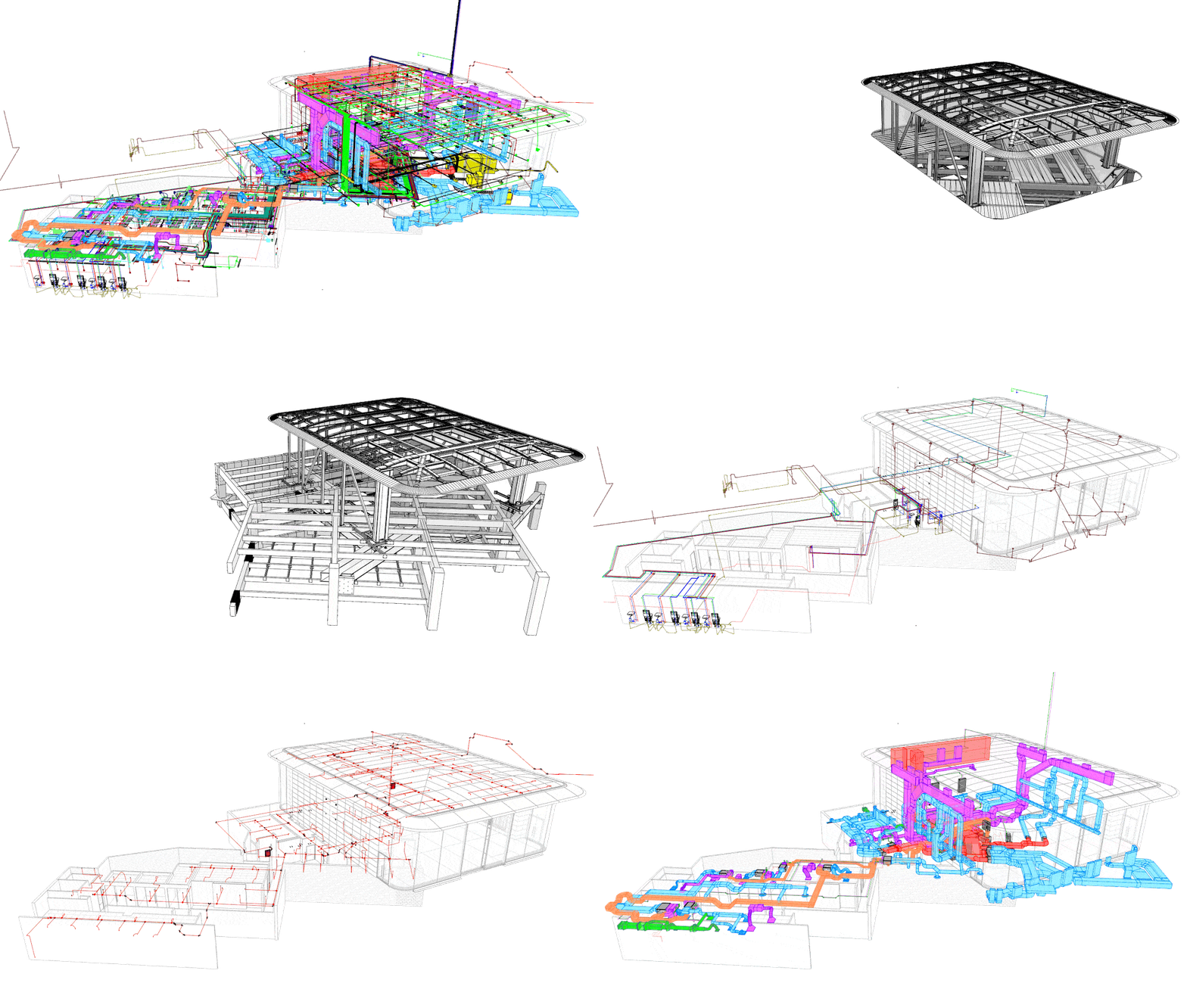
Comparison between federation and Integration
Collaboration Workflow
Federated workflows allow disciplines to work independently while periodically coordinating. This gives teams flexibility and clearer boundaries.
Integrated workflows create a more connected environment where updates and changes are visible much faster across teams.
| Federated models support controlled collaboration. | Integrated models support continuous collaboration. |
File Management & Performance
Federated models are easier to manage because files are still disciplined specific.
This improves:
- Performance
- Loading speed
- File organization
Integrated workflows can become resource-heavy if models are not refined properly, especially in:
- Airports
- Hospitals
- High-rise towers
- Infrastructure projects
Clash Detection & Coordination
Federated workflows depend heavily on scheduled coordination sessions where linked models are reviewed together.
Integrated workflows improve clash visibility because updates happen more dynamically within the shared environment.
Model Ownership & Responsibility
One of the biggest strengths of federated workflows is clear ownership of the model elements.
- Architects control architecture.
- Engineers manage structure.
- MEP teams keep services.
Integrated workflows require more shared responsibility, which means:
- Strong BIM execution plans
- Defined permissions
- Clear collaboration standards
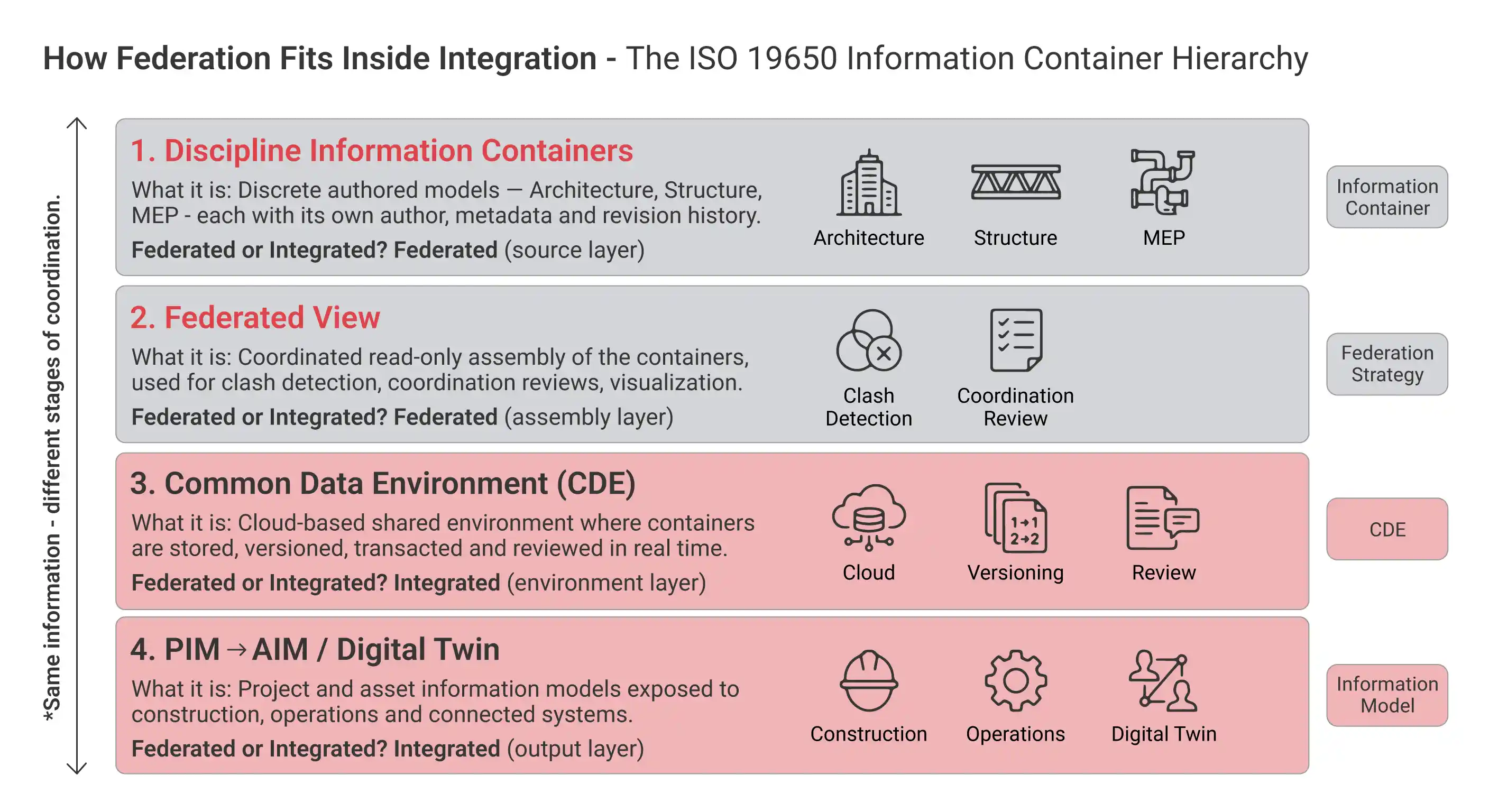
Under ISO 19650, federation and integration are not competing choices, they are consecutive layers of the same information workflow.
Which Model Type Works Best in 2026?
There is no universal answer to this question. The right workflow depends on:
- Project scale
- Team structure
- Contract model
- Technology maturity
- Coordination requirements
| Federated Models | Integrated Models |
| Traditional consultant-based workflows | Smart buildings |
| Large multidisciplinary teams | Digital twin environments |
| Projects needing clear discipline ownership | IPD-based workflows |
| Teams working on separate software ecosystems | Highly collaborative teams |
The Real Trend in 2026: Hybrid BIM Workflows
In 2026, most Building Information Modeling teams are no longer working with a federated or fully integrated approach. They are using a mix of both now. Instead, Building Information Modeling projects are increasingly adopting workflows that combine the strengths of both systems.
This means Building Information Modeling teams can keep control of their work with federated models. At the time, they can use integrated platforms to work together and share Building Information Modeling project data. As Building Information Modeling projects grow and incorporate more data, this balanced approach helps Building Information Modeling teams work more effectively without sacrificing flexibility.
People are not choosing one system over the other anymore. The Building Information Modeling industry is moving towards workflows that combine flexibility with connectivity.
Coordination and clash detection are what BIM is actually being used for.
Global research from buildingSMART International reports that 85% of practitioners now cite 2D/3D design coordination as the leading process optimized by BIM, and 72% name clash detection and quality checks as core BIM use cases. Both are federated-model activities by definition: they depend on discrete discipline containers being brought together in a coordinated view. This is the strongest data-backed argument for why federation is not going away, even as CDEs and digital twins become the default environment.
Modern hybrid BIM workflows help teams achieve:
- Better file performance and management
- Clear discipline ownership
- Faster coordination and clash detection
- Improved cloud collaboration
- Better support for digital twins and smart building workflows
Conclusion
The topic of BIM workflows has matured in 2026. People have become acquainted with the advantages of both federated and integrated models, but they are not intent on deciding which is better. Each approach can solve different problems, and depending on a project’s size, complexity, and coordination, each has advantages. It is not “one or the other” anymore; it is about how you can use both to work best together to get the best. Despite federated models, each discipline keeps control, file management is eased, and team members can work flexibly.
Now, BIM-based integrated environments are driving projects to collaborate in new ways, enabling real-time changes, and making workflows smarter through data, creating digital twins and connected building systems. The way teams work together is where things are changing throughout industry. It is not just a workflow being adopted by teams; it is a system of interrelated, flexible workflows being created.
This ensures communication of information between teams. It is not the highest-tech software that makes for the best BIM process, but the process that helps ensure projects are built with fewer issues and better decision-making as teams communicate and collaborate. BIM workflows are collaborative, cooperative, and communicative. The use of BIM enables teams to make decisions and deliver projects.