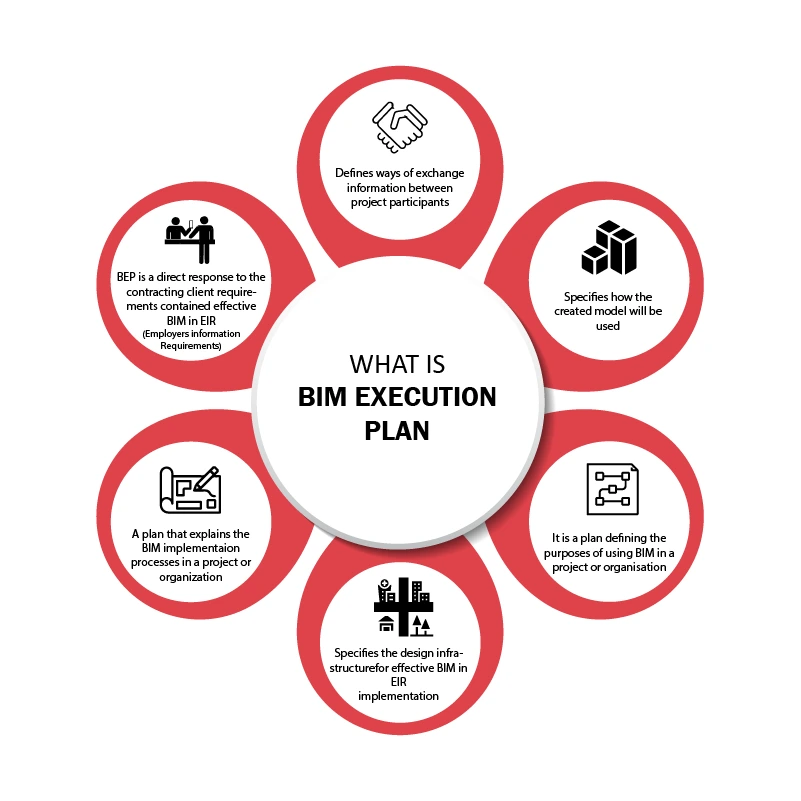
Building information Modeling (BIM) is a major component in the contemporary construction, engineering, and architectural endeavors. However, despite most companies utilizing BIM tools and standards, the success of a BIM project is still dependent on a single document the BIM Execution Plan (BEP).
A properly developed BEP is a road map to the entire project team. It describes the flow of work, the responsibility of each person on what to do, the model standards to follow, how to coordinate, and data sharing. However, there are still several projects that have issues due to a poor BEP having been rewritten, or being regarded as a formality.
An even-closer relationship will be found between BIM and cloud collaboration, digital twins, and automated workflows by 2026. The BEP is even more essential in that. In case of the weak BEP, teams may experience coordination issues, model errors, re-work, and delays.
55% of North American firms now mandate ISO 19650 compliance within their BEPs to qualify for government infrastructure bids, reflecting a shift toward strict information governance.
Here in this blog, we discuss the top 10 mistakes in the execution plan of a BIM to avoid in 2026, and provide practical advice on how to avoid such mistakes and ensure that projects get executed more easily.
BIM Execution Plan
I. Treating the BEP as a Template Instead of a Strategy
The most common errors that organizations commit is to copy BEP templates used in past projects without modifying them. Although templates are useful in offering structure, each project has peculiarities, stakeholders, as well as delivery expectations.
The BIM environments are becoming complex in 2026 with cloud platforms, integrated project delivery approaches, and multi-disciplinary collaboration. A generic BEP usually results in gaps in processes and workflow misunderstanding. A BEP is not a document but a strategic planning document that must be presented as such.
Why this causes problems
- Project-specific requirements are ignored
- Stakeholder responsibilities remain unclear
- Coordination workflows may not align with actual project needs
- Model deliverables may not match client expectations
How to avoid this mistake
- Customize the BEP based on project scope and client requirements
- Conduct a BEP workshop with stakeholders
- Align the BEP with Employer Information Requirements (EIR)
- Define project-specific modeling workflows
II. Poor Roles and Responsibilities
The other significant error is the inability to specify the person, who should do what in the BIM workflow. In the absence of a defined role, the same work tends to be done more than once or one may assume that the other person will do an important job. An effective role hierarchy makes the project team accountable and efficiently work together.
This is especially troublesome when there are several consultants, contractors, and BIM managers on the same model.
Common issues caused by unclear roles
- Duplicate modeling tasks
- Conflicts during model coordination
- Delayed issue resolution
- Accountability problems during project reviews
Best practices to define responsibilities
- Create a BIM Responsibility Matrix
- Clearly define roles such as:
- BIM Manager
- BIM Coordinator
- Model Author
- Information Manager
- Specify who manages coordination meetings
- Assign responsibility for model validation and QA/QC
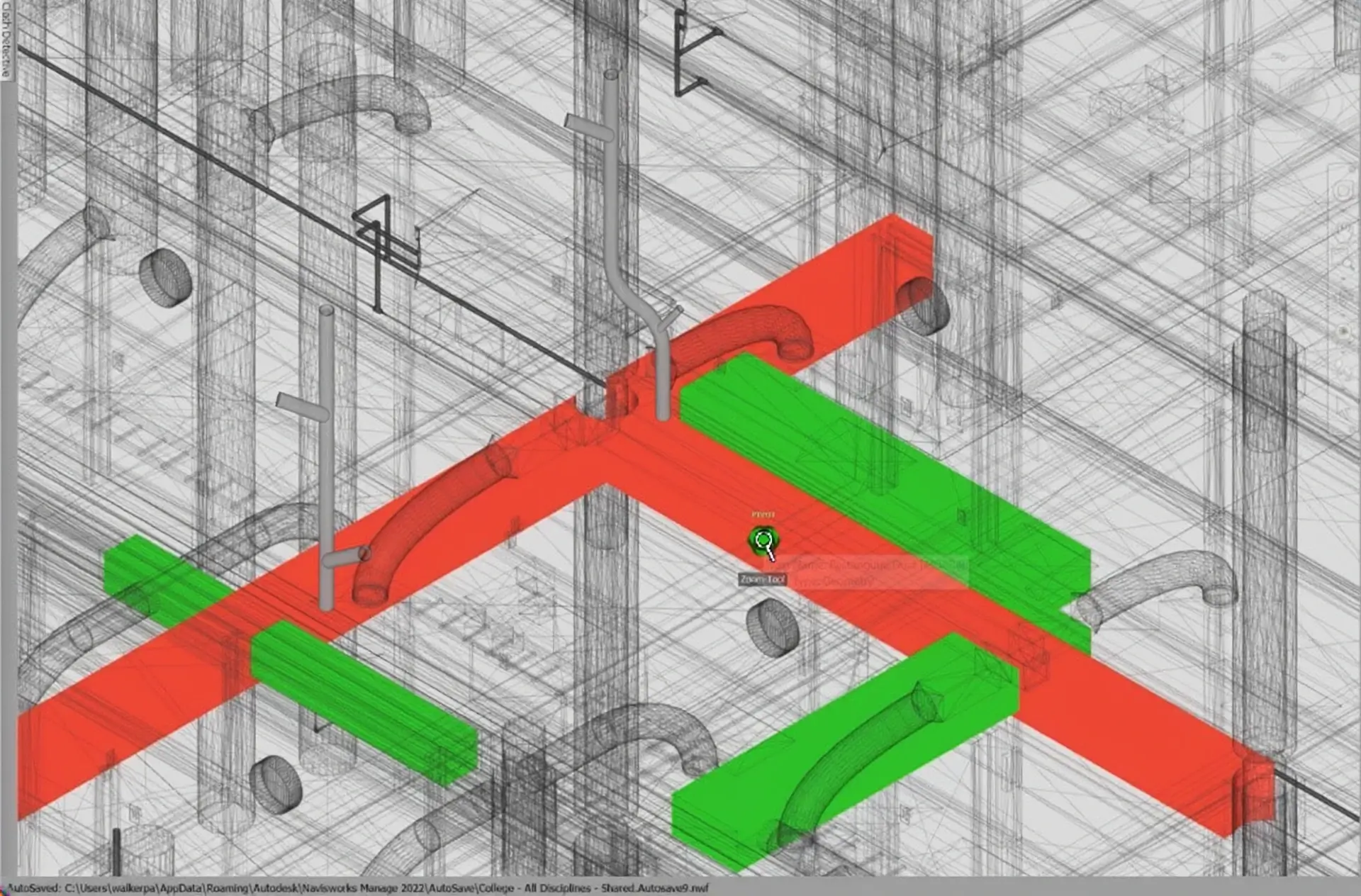
BIM Coordination and Clash Detection
III. Poor Definition of Level of Information and Detail
As LOD frameworks continue to transform into Model Development Specifications (MDS), most BEPs continue to use outdated or even imprecise LOD definitions.
Without defining the needed Level of Information and Geometry, there can also be over- and under-modeling of elements by the teams, which results in inefficiencies. This makes sure that the model has the appropriate information within the appropriate stage of the project.
Problems caused by poor LOD definitions
- Unnecessary modeling effort
- Missing information during coordination
- Confusion during construction documentation
- Inconsistent model quality across disciplines
Steps to improve this
- Define model requirements per project phase
- Use Model Element Tables
- Specify:
- Geometry detail
- Data attributes
- Performance data
- Align LOD with actual project deliverables
IV. Ignoring Data Standards and Naming Conventions
BIM models soon get out of order when there are no regular standards of naming. There may be differences in the labeling of files, families, and parameters between teams, and thus making it hard to collaborate.
The consistency of data is required with the increase in size and complexity of BIM projects to coordinate and automate. Enhanced search compliments can be achieved by using clear data standards, which enhance automation and long-term management of assets.
Common data inconsistencies
- Different file naming formats
- Inconsistent parameter naming
- Duplicate families and objects
- Misaligned classification systems
How to standardize project data
- Define file naming conventions
- Establish shared parameter standards
- Use recognized classification systems such as:
- Uniclass
- OmniClass
- Document naming rules in the BEP
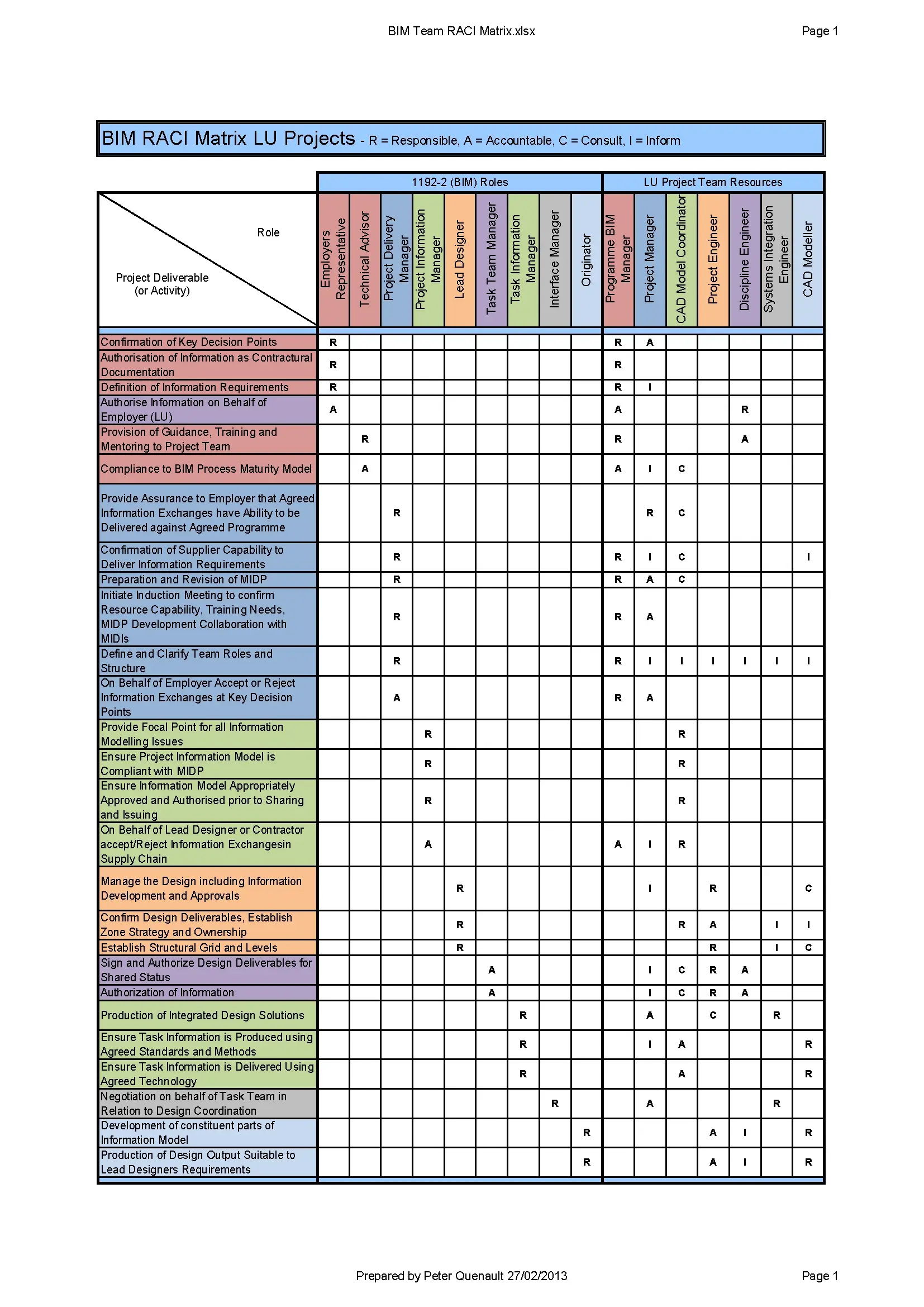
BIM Responsibility Matrix—SOURCE
V. Weak Model Coordination Strategy
BIM models soon get out of order when there are no regular standards of naming. There may be differences in the labeling of files, families, and parameters between teams, and thus making it hard to collaborate. The consistency of data is required with the increase in size and complexity of BIM projects to coordinate and automate. Enhanced search compliments can be achieved by using clear data standards, which enhance automation and long-term management of assets.
A well-defined coordination process helps prevent construction-stage conflicts. Problems caused by weak coordination workflows
Problems caused by weak coordination workflows
- Late discovery of clashes
- Repeated conflicts between disciplines
- Delays in resolving coordination issues
- Inefficient coordination meetings
Strong coordination strategies include
- Defined clash detection schedules
- Clear responsibility for running coordination checks
- Use of coordination platforms
- Issue tracking workflows
Typical coordination steps include:
- Model submission by discipline teams
- Clash detection and issue identification
- Issue assignment and tracking
- Coordination meetings
- Updated model submissions
VI. Overlooking BIM QA/QC Processes
Most teams waste a lot of time creating models and leave the issue of quality checks. Unless there is a definite QA/QC plan, BIM models may contain inaccurate numbers, incorrect shapes or lack information. QA/QC must not occur at the end of the project but should occur at any given time.
Common QA/QC issues
- Incorrect element categories
- Missing metadata
- Modeling inconsistencies
- Poor model performance
Recommended QA/QC steps
- Use automated model checking tools
- Conduct discipline-level model reviews
- Validate parameters and metadata
- Run model audits regularly
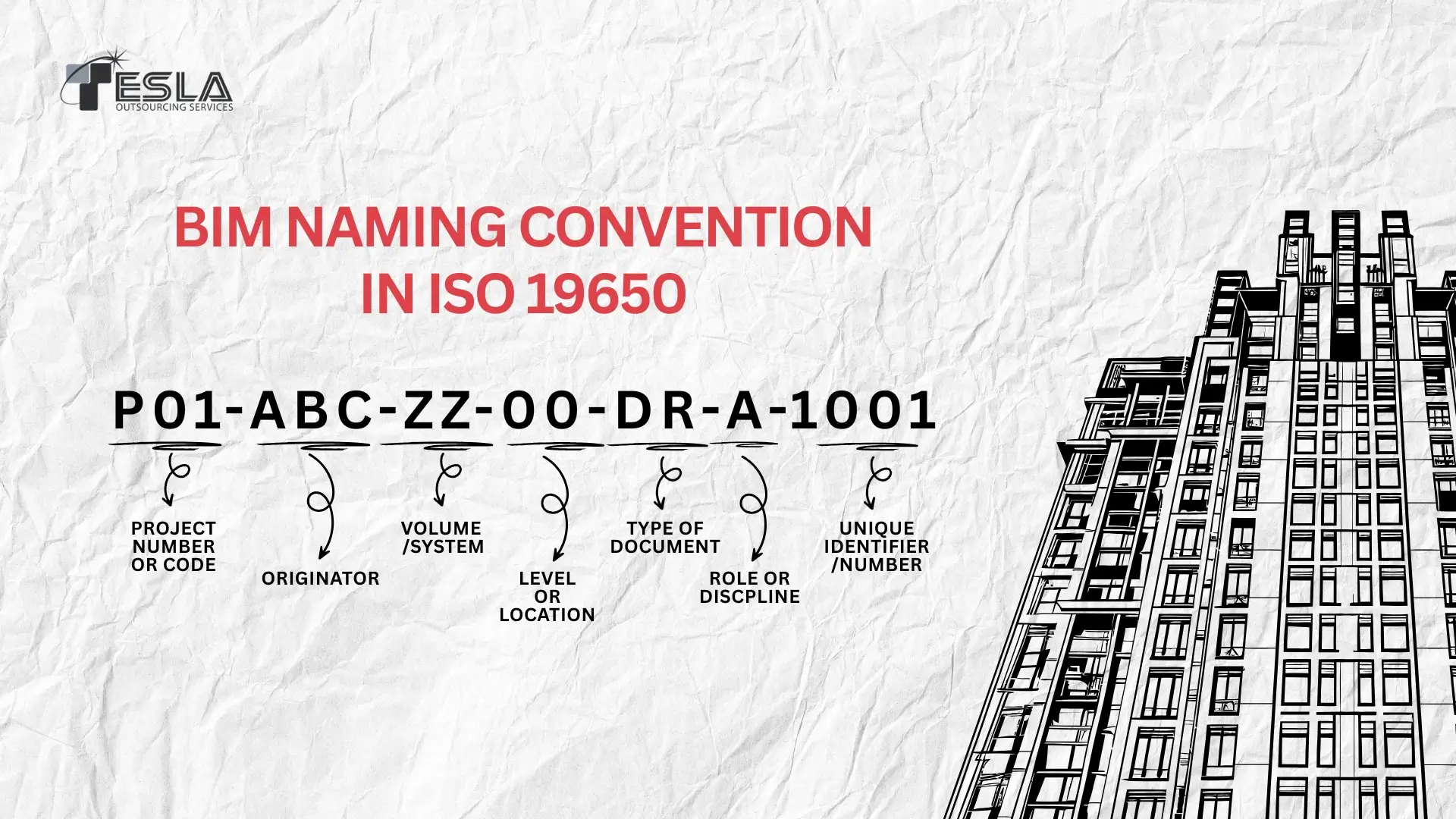
Standard Naming Convention
VII. Failing to Define Information Exchange Workflows
The BEP must clearly define how and when project information will be exchanged between stakeholders. If these exchange points are not clearly defined, teams may deliver incomplete models or inconsistent datasets. This ensures that all stakeholders work with the correct and updated information.
Problems with unclear exchange workflows
- Delayed model submissions
- Missing deliverables
- Confusion in model versions
- Coordination breakdowns
Information exchange should include
- Model submission schedules
- File formats for exchange
- Approval workflows
- Version control procedures
VIII. Ignoring Cloud Collaboration Protocols
Most BIM projects in the year 2026 utilize cloud collision solutions. However, many BEPs do not use organized cloud work, but still use old file-sharing techniques. Cloud collaboration protocols ensure secure and structured project data management. Without proper protocols, teams may accidentally overwrite models or work on outdated versions.
Common cloud collaboration problems
- Sync conflicts
- Multiple file versions
- Mismanaged work-sharing
- Accidental model overwrites
Cloud-integrated coordination workflows (CDE) can improve project delivery speed by up to 20% compared to traditional file-sharing methods often found in outdated BEPs.
Best practices for cloud workflows
- Define common data environments (CDE)
- Establish folder structures
- Set permissions for project teams
- Document model publishing workflows
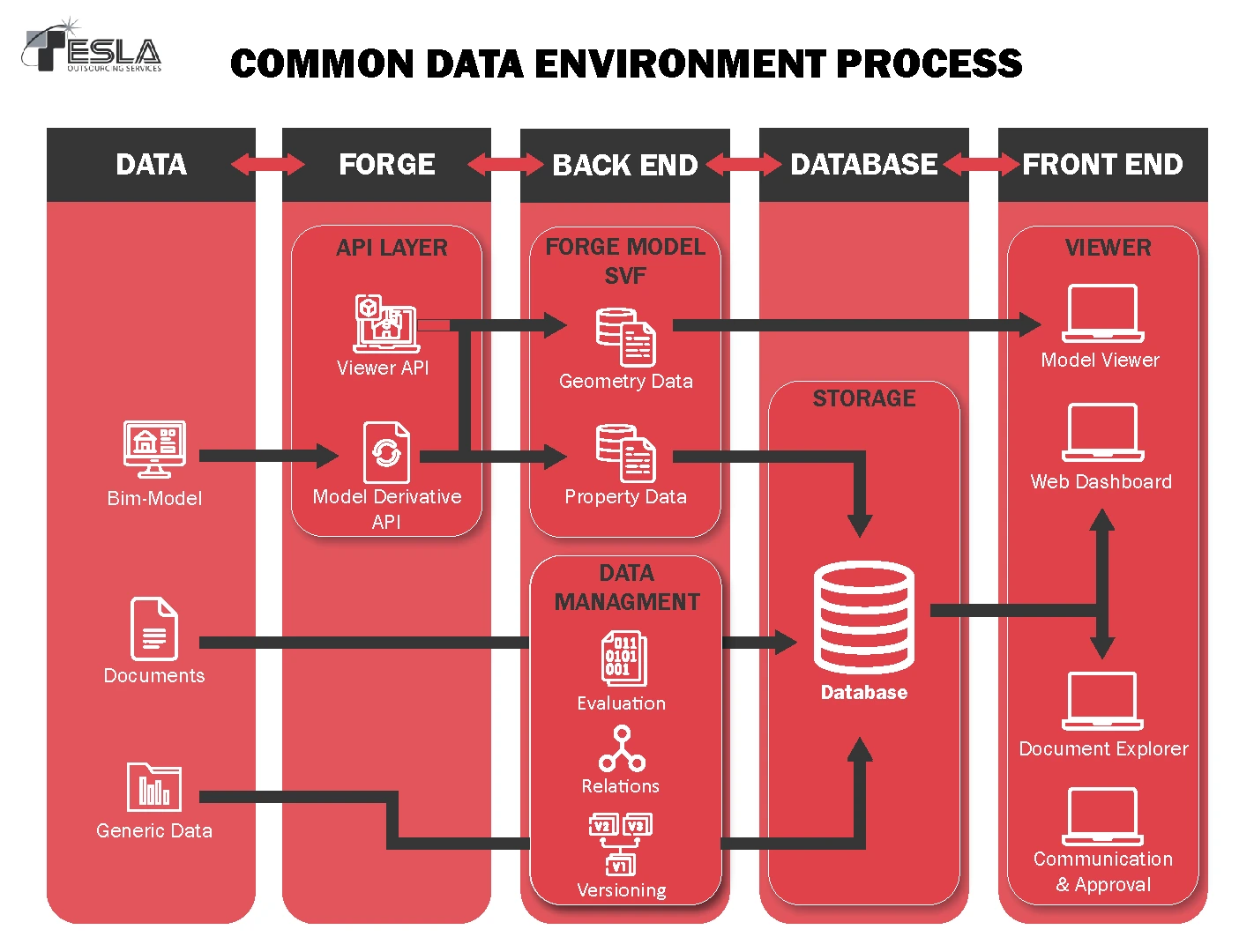
Common Data Environment Process
IX. Lack of Training and BIM Skill Alignment
Even a brilliant BEP will fail provided the team does not comprehend the steps in it. Similar firms and consultants possess dissimilar BIM skills that may cause holes in the way the work is conducted. With a clear understanding of the BEP, work becomes a great deal easier when teams are carried along.
Common training issues
- Team members unfamiliar with project standards
- Misuse of BIM software tools
- Incorrect parameter usage
- Inefficient modeling practices
How to improve BIM readiness
- Conduct BEP training sessions
- Organize kick-off BIM workshops
- Provide documentation and guidelines
- Offer support during early project stages
X. Not Updating the BEP During the Project
A lot of companies complete BEP in the beginning of a project and do not revise it after that. Projects also evolve and so do workflow. The BEP is maintained and this makes it useful throughout the project. Fixed BEP is prone to becoming erroneous with the change in needs.
Why this becomes problematic
- New stakeholders join the project
- Project scope evolves
- Modeling workflows change
- Coordination methods improve
According to the 2025 Global BIM Management Report by Autodesk, 68% of project delays in large-scale infrastructure are now attributed to “document-based bottlenecks,” primarily stemming from static, unrevised BEPs that fail to evolve with project phases.
Recommended approach
- Treat the BEP as a living document
- Schedule periodic BEP reviews
- Update workflows when necessary
- Document all revisions
Conclusion
By 2026 BIM continues to receive such new technology as digital twins, AI coordination, and enhanced cloud sharing and hence a good BIM Execution Plan is increasingly vital. Common BEP mistakes can be avoided, which can make the projects better, minimize coordination issues, and enhance teamwork.
An effective BEP must have concise guidelines, suitability to the team and continuous enhancement. Tackling BEP is not about paperwork but a planning tool and teams can make use of BIM in its entirety. A properly developed BIM Execution Plan allows everyone to work without any problems, models are precise, and information can flow easily between design and construction and further.