This is a shift to cloud-based workflows in the architecture, engineering, and construction (AEC) industry. It is a transition to cloud-based workflows within the architecture, engineering, and construction (AEC) industry. The requirement of real-time coordination and execution, tight deadlines, and operating in a globally distributed site, and working on different aspects of projects, may strain the traditional desktop CAD workflows. The designers continue to alternate between tools, one to create a sketch, another to create a draft, another to look at the markups, etc, which causes delays, differences in versions and loss of communication.
Solutions to these issues include cloud-based CAD tools, which allow drafting via browser, collaborative work between multiple users, online mark-ups, and centralized control of files. Software like AutoCAD Web, Onshape, Trimble Connect, and Rayon reflects a fresh dawn of the process of creating and reviewing drawings.
This blog will be discussing about “Rayon”- a next-generation web-based design platform that is shaking the architectural drawing process. It is designed keeping in mind architects and interior designers as a tool that combines the drafting and collaboration features with visualization features in a single cloud-based environment.
A study found that 91% of construction industry professionals agree that technology for data sharing and collaboration is critical to project delivery, directly addressing key pain points solved by Cloud CAD—SOURCE
Rethinking the Architectural Drawing Process
It is useful to identify the standard workflow that many firms continue to, before delving into the richness of Rayon, where there are sources of inefficiencies:
- Concept/Sketch Phase: This is a phase where the activity concerned is making hand drawings, bubble drawings, or rough digital drawings to play around with what space can be planned, layout and massing.
- CAD Drafting Stage: These sketches are turned into technical drawings, e.g., floor plan, elevations, sections, etc., that are drawn/painted using special CAD software. Layers, line weights, annotation and blocks need to be on.
- Detailing and Documentation: Once the simple drawing has been completed, you transition to the joinery details, construction drawing, schedules, and specifications. On other occasions, another tool or a workflow will be necessary.
- Presentation / Handoff stage: The drawings are organized to be presented to the client and are then printed in PDF format and delivered to the consultants/ contractors in a format such as DWG, etc. Files can travel between tools and human beings.
- Collaboration & Revision Loop: Feedback and reactions of the client, consultant, and contractor result in new drawings with new versions, which cause headaches in terms of version control and rework.
The resultant effect is addictive time spent on changing tools, re-keyboarding data, having various file versions and communication between the stakeholders. Efficiency and clarity are the urgent needs of many companies, not only large ones but also small companies and those companies that deal with numerous interior design/renovation projects.
48% of AEC firms report that the largest positive impact of cloud-based technology is the reduction in time spent on version control and administrative tasks, which directly leads to faster drawing turnover—SOURCE
What Cloud-Based CAD Platforms Offer
Cloud-Based CAD Platforms market themselves as the quickest ways to make flawless architectural illustrations. Rayon is cloud-native and requires no installations or complicated commands, unlike traditional CAD tools, which require heavy installations and complicated commands.
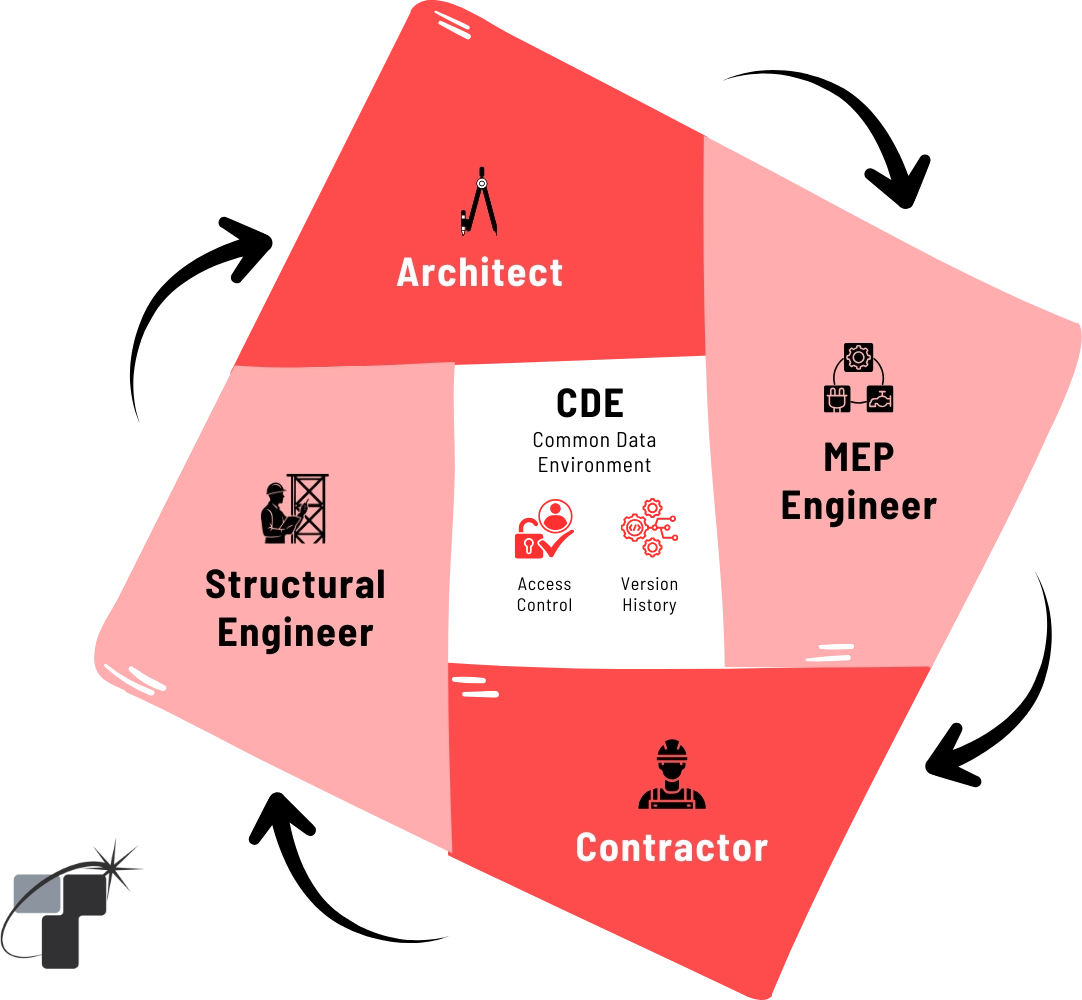
Governed Data Management & Real Time Coordination
Unified Drawing and Documentation Platform
Cloud-Based CAD Platform helps to avoid the necessity of changing between various tools used to design, draft, and present. Users can:
- Neglect drawing walls, zones, as well as openings with accuracy.
- Insert notes, icons, and dimensions directly in the same workstation.
- Use custom styles and weights of lines to make presentation-ready drawings.
- Create sets of detailed documentation of the same model.
Rayon, as a software, has an integrated strategy that reduces any interruption to the workflow and assists designers in staying in design intent throughout the design process.
Real-Time Cloud Collaboration
Real-time collaboration is one of the best things that cloud-based platforms offer. They allow multiple users to work on the same drawing at the same time – just another example of collaborative working on Google Docs. The platform includes:
- Design review comment and markup.
- Version History (Time Machine) to keep track of the changes and go back to earlier versions.
- Auto updates to all team members, consultants, or clients to get the most recent version in real time.
Rayon, as a software, has a dynamic interaction that saves on back and forward email communication and does away with confusion over the version of a file that is up-to-date.
Extensive Built-In Libraries and Templates
Cloud-Based CAD Platform provides multiple built design elements and templates; these include furniture and fixtures, as well as conventional architectural blocks. This is time-saving in terms of setup, and it is also very consistent in terms of drawings. Designers can also:
- Design bespoke libraries of firm standards.
- Standardize between projects.
- Retain brand identity using standard graphic styles and symbols.
Import, Export, and Compatibility
Cloud-Based CAD Platform supports:
- Import formats: DXF, DWG, PNG, PDF, and images.
- Export formats: DWG, PDF, and presentation as a vector graphic.
This interoperability has ensured that designers can work easily with other consultants who continue to use the traditional CAD platforms. It is also particularly useful when the team is changing slowly to a cloud solution that replaces AutoCAD.
Detail Drawings and Scheduling
Cloud-Based CAD Platform also supports:
- Accurately draft wall sections, joinery details, or furniture elevations.
- Creates item schedules and material take-offs for the elements of drawing.
- Prepare the procurement, budgeting, and specification lists in the software in tabular format.
This solution removes manual errors in data entry and eases the documentation of both the contractors and clients.
How Tesla Outsourcing Services Uses Cloud CAD in Production
At Tesla Outsourcing Services, integrating cloud CAD tools into our drafting workflow has improved collaboration, response time, and final CD accuracy for Critical Time-Bound Projects. Here’s how our typical process works:
Step 1: Space Planning
One can use the blank canvas or load a PDF or DWG into the designer. They can test design options and make room layouts very fast using intuitive wall, zone, and object tools. We use cloud software for quick exploration and to speed up the process. With the snapping and the alignment capabilities, one can be sure of accuracy in geometry at the concept stage itself.
Application Example: A cafe interior designer can have the option to experiment with seating plans and the location of decorations, keeping in mind real-life size habitats, all in a few minutes.
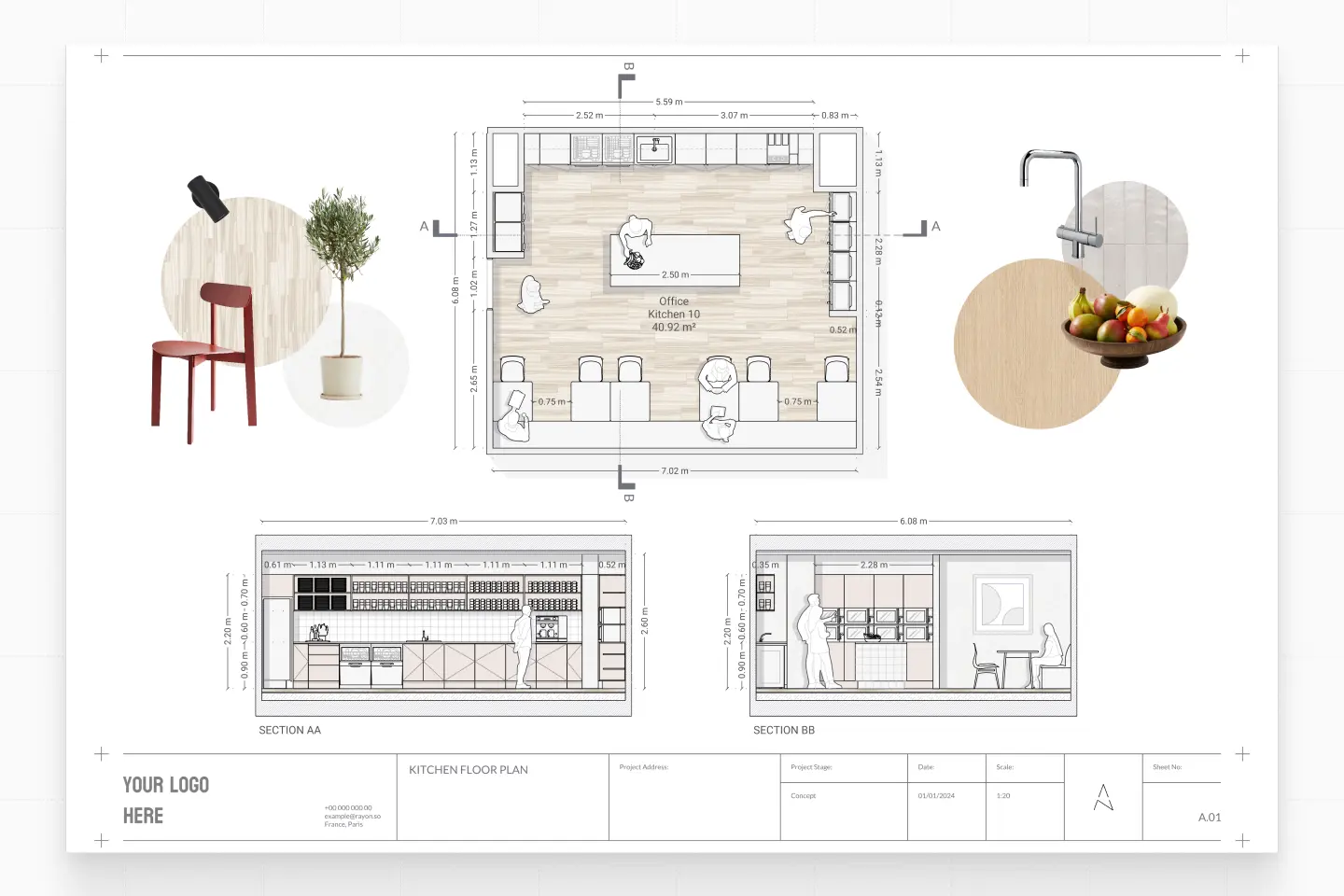
Drag and Drop Furniture Blocks
Step 2: Design Development
After giving approval to the idea, the same drawing translates to a detailed plan. After this, our team continued to refine the drawing.
- The layers and annotation tools are used to reveal the flooring, lighting, or MEP layouts.
- Doors, windows, and fixtures of the cloud software library are fitted using standard measures.
- There is a regularity in the weights and styles of the lines added with notes and dimensions.
Because cloud software typically maintains a consistent graphic style, our client can visualize the plan in a more efficient manner. It also gives a coordinated base to our team for BIM Modelling.
Step 3: Detail Drawings and Documentation
In the case of working drawings, we leverage cloud software to make sections, elevations, and detail drawings in the same file. This helps us in depicting joinery, wall constructions, or tailor-made furniture.
This cannot be underestimated in the case of interior studios, as we are able to generate a layout all the way up to an exploded piece of furniture without the need to change tools.
Step 4: Collaboration and Review
Our team members and clients can log in and view the drawings that can be commented on or indicated with revisions online. The version history follows a clear design development path, and all change is recorded in the history.
This not only makes teamwork better but also helps in winning the client’s trust through the visibility and participatory design process.
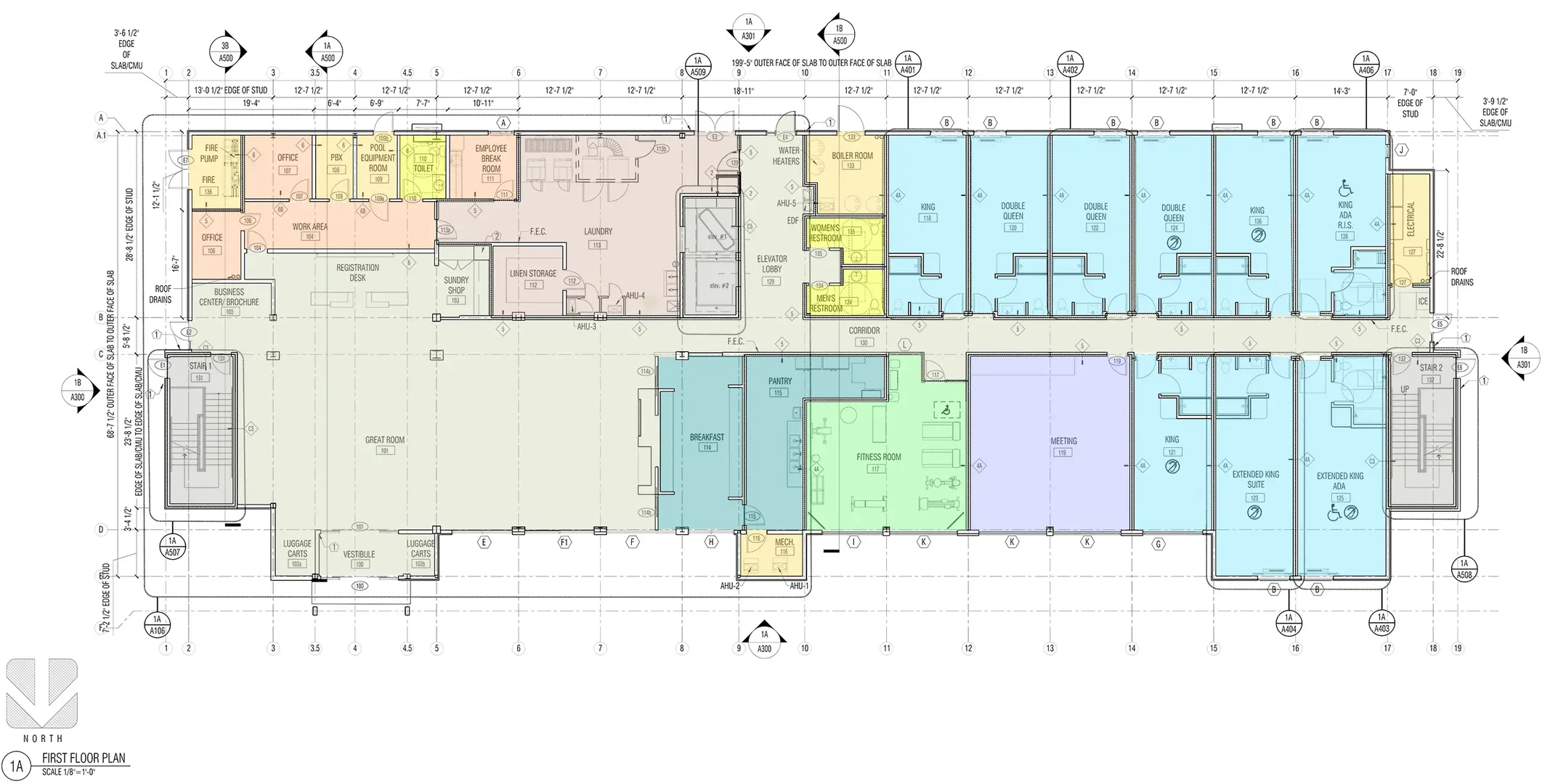
Floor Plan of a Hotel Building (Part of CD Set)
Step 5: Export and Final Delivery
When done, the complete drawing set may be exported either in the DWG or PDF format. Typical cloud CAD maintains scales and accuracy; therefore, such files can be printed or submitted digitally. Its export option makes it compatible with consultants on AutoCAD, Revit, and so on.
How Cloud Platforms Speed Up Modern Architectural Workflows
Cloud CAD Platforms speed up the architectural workflows in several ways:
Faster Turnaround
Cloud CAD tools also simplify the overall drawing process since one can engage in concept design, revisions, mark-ups, and documentation through one browser-based platform. Features such as:
- ready-made templates
- reusable symbol libraries
- drag-and-drop components
- instant updates
It enables teams to concentrate on design making instead of repetitive drafting work. This will shorten the project schedule and accelerate the process of approvals and amendments.
Smoother Collaboration
Real-time, multi-user editing is considered to be one of the largest benefits of cloud CAD. Teams can:
- Discuss drawings with one another over the internet.
- Write down comments on the sheet.
- Track version history Drawings.
- Share without file-to-file sharing.
Miscommunication is reduced because everything is updated immediately. This eliminates the need to use PDFs delivered through emails or obsolete ones stored in common folders. The outcome is a more straightforward, transparent work process between all stakeholders.
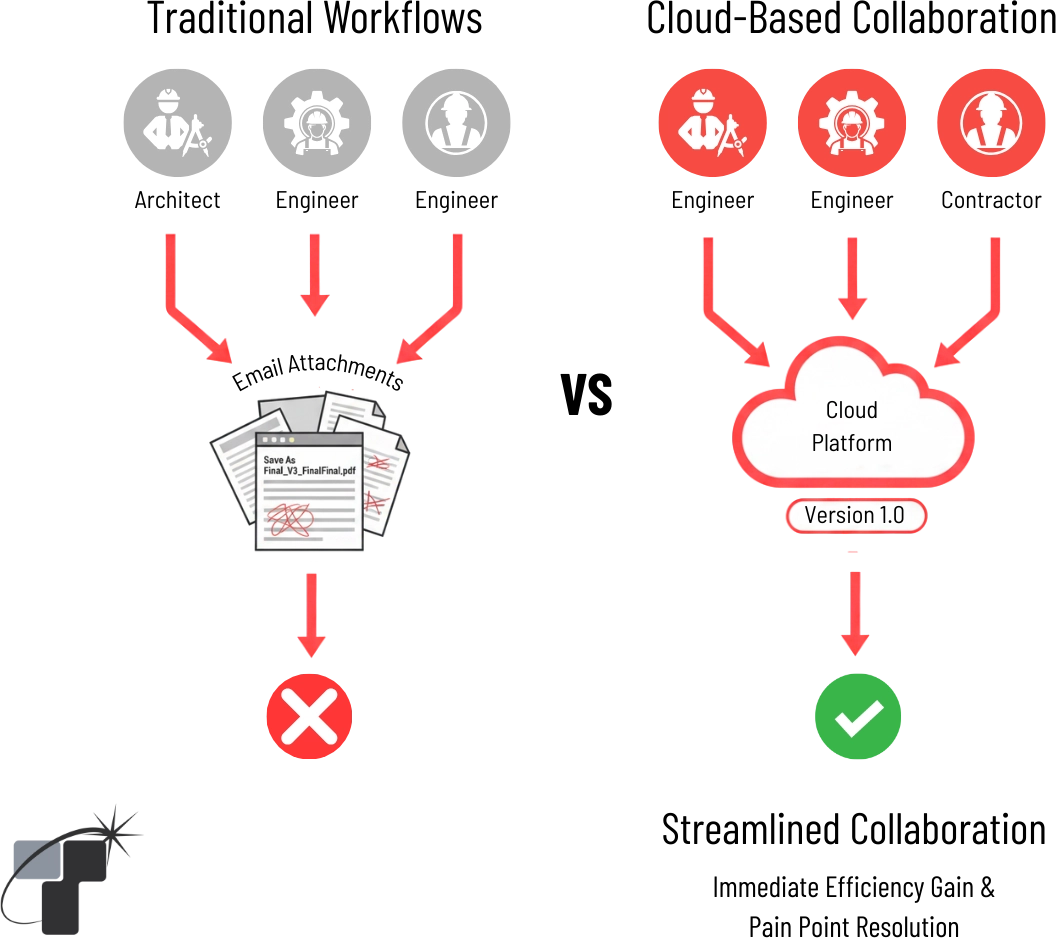
Efficiency Gain and Pain Point Resolution
Cost-Effective for Small Firms
Cloud CAD solutions operate directly within a web browser and therefore do not require costly hardware or thick client installations. This makes them ideal for:
- Freelancers
- Independent drafters
- Small architecture firms
- Educational institutions
Teams can be equipped only with an internet connection and a regular laptop without spending on a high-end workstation or complicated license servers. This reduces the costs of operations and yet can provide professional drafting services.
Comparison: Cloud-Based CAD Platform vs Traditional CAD
This analogy helps to clearly understand that Cloud-Based CAD Platforms are placed as a new alternative to the traditional drafting software, especially one design studios that need to be agile and collaborative.
| Parameter | Traditional CAD Tools | Cloud-Based CAD Platform |
| Installation | Requires a heavy desktop setup | Cloud-based, runs in browser |
| Collaboration | Single-user; manual file sharing | Real-time multi-user editing |
| Learning Curve | Complex commands & layers | Simple, intuitive interface |
| Libraries & Templates | Mostly manual setup | Multiple ready-to-use assets |
| Workflow Integration | Separate tools for presentation | Unified drawing-to-presentation |
| Cost | High licensing & hardware cost | Subscription-based, low overhead |
| Accessibility | Device and location dependent | Accessible from anywhere |
Real-World Benefits
Implementation of cloud-based CAD solutions has several real-life benefits to the Architectural and construction documentation process:
- Cloud CADs prevent drafters, consultants, and clients who are working on the same drawing at different times. Live information will minimize misunderstanding and allow smoother coordination among the locations and time zones.
- Browser-based annotations and live markups reduce mistakes brought about by the old files or the absence of comments. Given that all the edits occur within a common environment, the teams do not experience redundant work and reworking of commissions.
- Customers have a chance to receive the drawings online, read the updates in real time, and comment on the sheets. This reduces the time taken in the approval process to ensure that projects are not procrastinated.
- The files, versions, comments, and markups are all saved in a secure cloud drive. This makes it easy to track, manage documents easily, and the possibility of losing data in different folders is minimized.
- Cloud-based CAD systems provide untouched graphic designs, uniform annotation facilities, and presentations ready outputs free of file transfers to independent software. This enhances professionalism and clarity at all the drawing levels.
Design collaboration platforms that offer real-time model access can reduce the number of Request for Information (RFI) submissions by up to 30%, significantly streamlining the construction drawing phase—SOURCE
Limitations to Keep in Mind
Although cloud CAD systems have significant benefits, they are associated with several limitations:
- The current cloud CADs are based on 2D drafting, early mark-ups, and a fast editing process. They lack the level of sophistication that is needed in parametric modelling, clash detection, and coordinating BIM.
- Since these systems are online, one must have a consistent internet connection. The capabilities of offline drafting are lower than compared of desktop CAD software.
- Browser-based CAD platforms may not yet have some specialized CAD commands or automation tools, or even industry-specific plug-ins.
Why Cloud CAD represents the Future
The AEC sector is gradually moving towards cloud-based operations, cross-platform penetrability, and integrated processes. Cloud CAD tools capture this change through the provision of:
Minimalism to Rapid Design Processes.
Their simple and intuitive interfaces enable designers to concentrate on the accuracy and clarity, but not the complexity of the tools.
Distributed Workgroup Co-operation.
Cloud CAD is also very convenient in remote working conditions and managing the coordination of global consultants, as different parts of the world can make real-time edits, and document management is centralized.
Cloud CAD is not upstaging BIM; instead, it is integrated into the workflow at the early stage, which enters BIM to provide in-depth documentation of the construction. However, as you transition from agile cloud drafting to complex BIM environments, managing data connections becomes critical. To ensure a smooth handover, it is essential to understand the complexities and best practices of File Linking in Revit.
Conclusion
Cloud-based CAD software is transforming the design and review process of architectural drawings, as well as the coordination of architectural drawings. These tools eliminate most of the bottlenecks in the old desktop processes by taking concept development, markups, collaboration, and documentation online in one place.
At Tesla Outsourcing Services, cloud CAD other drafting tools based on the browser – can be utilized during the initial phases of the design development. They assist our staff to work in real time, get in sync fast with the client’s requirements, and shift more easily to the intricate BIM models, which are used to create the construction documents.
With the industry still returning to integrated, distributed, and digital-first workflows, cloud CAD will still be an effective way to bridge that gap between conceptual design and fully coordinated BIM deliverables: to work as a team that cares about what really matters: the development of accurate, impactful, and highly coordinated built environments.
Ready to move past desktop limitations and achieve real-time, error-free collaboration on your construction drawings? Contact us to integrate Cloud CAD workflows today!
Contact Us