In today’s global construction market, it is rare for a project to be managed from a single office. Due to this most projects involve several different architects, structural engineers, MEP consultants, and contractors from all parts of the world. Each will use a variety of different BIM software tools to complete their part of the work and therefore it is essential that there is good interoperability between the different models created by each team member.
There are two ways to share project data, by using IFC files or native Revit files. In both cases there are big advantages for collaboration. The decision between IFC and native files from time to time depends on the BIM team and the project at hand. We already discussed native Revit files for better collaboration. In addition to native files, IFC files can also be used to improve collaboration on projects. IFC is a software neutral data format for building data.
In the end it all depends on what you want to achieve with a project, the software that the team members are using, the needs of the client and the data management in the long term.
Understanding BIM Interoperability
To transfer data between different software systems and between project teams in BIM projects, the interoperability of the transferred data is especially important. This means that all important project information, such as 3D models, material properties, as well as schedules, fabrication information as well as information for facility management must remain intact when transferring data between different teams and between different software systems.
Without proper interoperability, teams often face:
- Model corruption
- Missing parameters
- Broken geometry
- Coordination delays
- Duplicate work
- Rework during construction.
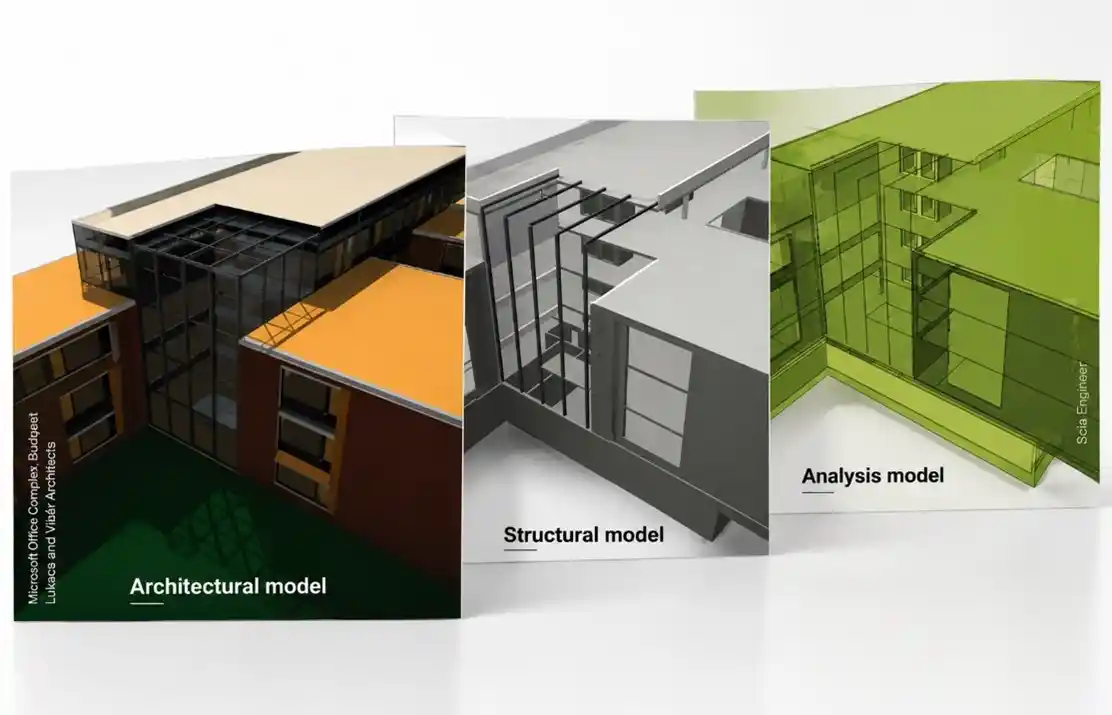
Different Model Different Disciplines
What Is a Native Revit Workflow?
The Autodesk Revit native file sharing model in BIM projects is a simple file model for sharing the original design RVT file with other cross-functional teams of consultants and building stakeholders. For design companies working in collaboration systems based on Revit, working with RVT files in a native Revit workflow is business as usual.
Why Many BIM Teams Prefer Native Revit
Native Revit workflows are popular because they preserve the model’s full intelligence. Every family, parameter, workset, schedule, and constraint stays editable and connected.
This enables teams to:
- Coordinate faster.
- Update models in real time.
- Maintain better parametric control.
- Reduce data translation issues.
- Improve clash detection workflows.
For highly collaborative projects, this creates a smoother design development environment.
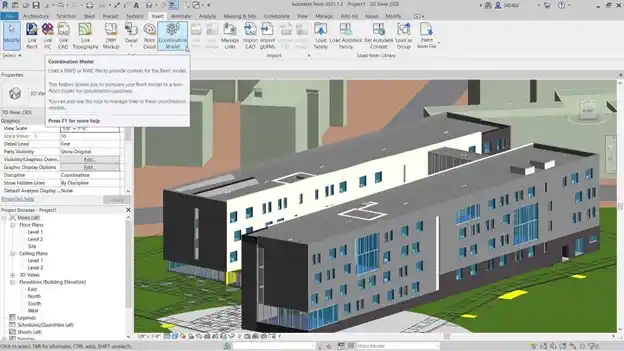
Coordination Model in Revit @ https://www.autodesk.com/eu/products/navisworks/features
What Is IFC?
Industry Foundation Classes (IFC)is an Open BIM File Format which is software-neutral and platform-independent, therefore suitable for use on all BIM software platforms.
Unlike native Revit files, IFC is not tied to a single software vendor. It allows models to move between platforms such as:
- Revit
- ArchiCAD
- Tekla
- Bentley Systems
- Vector works.
- Solibri
- Navisworks
The primary goal of IFC is to ensure that BIM information is still accessible regardless of the software platform used.
Why IFC Matters in Global Projects
IFC is crucial on multinational projects where many specialized BIM tools of the various disciplines are used. Moreover, many modelers from all over the world are also involved in such projects. IFC enables an effective exchange of the BIM data in such projects, without all team members can work with the BIM models using the BIM software they are used to. They do not all have to work with the same software.
This is why IFC has become a major part of open BIM initiatives and government BIM mandates worldwide.
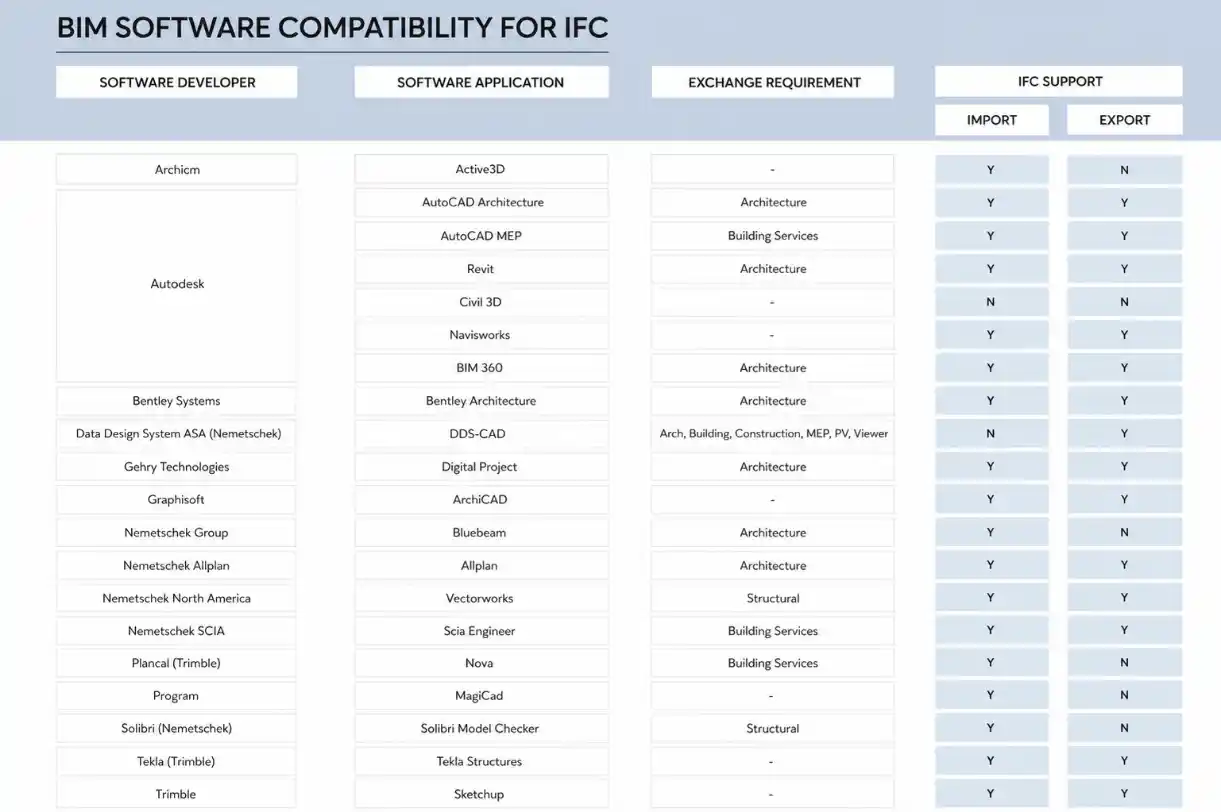
BIM software compatibility for IFC
Revit vs IFC: The Core Difference
The greatest strengths of a Revit file are the full access to design information of the project in the most powerful platform for BIM model management and analysis on the market by all team members. Interoperability between different building project information models is provided by IFC-enabled export/import functions to check, access and change BIM data created in other applications for the long-term afterwards. Therefore, the core difference between a Revit file and an IFC file is flexibility vs. openness. Therefore, for global design and construction, IFC is more suitable than native files.
Advantages of Revit Models
Revit workflows offer several powerful advantages, especially during active design and coordination phases.
Full Parametric Intelligence
One of the biggest strengths of native Revit files is the retention of complete parametric relationships.
Teams can fully access:
- Revit families
- Constraints
- Shared parameters
- Worksets
- Design options
- Schedules
- Annotations
This creates a highly flexible modeling environment.
Faster Coordination and Collaboration
Native workflows allow disciplines to link and coordinate models directly. Everyone can refer to the latest up to date documentation in real time whilst sharing model information.
This significantly improves:
- Clash detection
- Model updates
- Coordination reviews
- Documentation accuracy
Integration with Autodesk Ecosystem
Revit works smoothly with tools like:
- Autodesk Construction Cloud
- Navisworks
- Dynamo
- AutoCAD
For firms already working inside the Autodesk ecosystem, native workflows often feel more efficient and connected.
Challenges of Native Revit Workflows
Despite its advantages, native Revit collaboration also introduces several limitations.
Vendor Dependency
Native workflows heavily depend on Autodesk software. This becomes difficult when external consultants or contractors use other BIM platforms.
It can also create challenges in:
- Public-sector projects
- International collaborations
- Long-term facility management
- Open BIM compliance
Version Compatibility Problems
Different Revit versions can quickly disrupt workflows.
For example:
- One consultant may upgrade early.
- Another team may still use an older version.
- Downgrading is impossible.
- Upgrading can affect plugins and workflows.
This becomes especially problematic in long-duration projects.
Heavy File Performance
Large Revit models can become extremely resource intensive.
This affects:
- Remote collaboration
- Cloud synchronization
- File loading speeds.
- Model navigation
- Coordination performance
Global teams working across slower networks often face these bottlenecks.
Advantages of IFC Workflows
IFC offers major benefits for projects involving multiple software ecosystems and long-term BIM usage.
Open BIM Flexibility
The biggest advantage of IFC is software neutrality.
Different teams can collaborate without being forced to use the same BIM tool. This improves flexibility and reduces software dependency across global projects.
Better Long-Term Accessibility
IFC is widely considered more future proof for long-term asset management because it stores project data in an open format.
This is highly valuable for:
- Facility management
- Infrastructure projects
- Digital twins
- Government archives
- Smart building systems
Stronger International BIM Compliance
Many governments and infrastructure authorities now encourage or mandate IFC deliverables as part of open BIM standards. IFC helps ensure long-term accessibility beyond proprietary software ecosystems.
On 10 March 2026, BSI and NIMA released the Draft International Standard for the revised ISO 19650, which formally moves away from the term “BIM” in favour of “information management” and merges the delivery and operational lifecycle phases into a single process. For interoperability, this reinforces IFC’s long-term positioning: the standard’s new whole-lifecycle scope aligns natively with IFC’s open, software-neutral data structure and its suitability for facility management and digital twins.
This is common in:
- Airports
- Healthcare facilities
- Rail projects
- Public infrastructure
- Smart cities
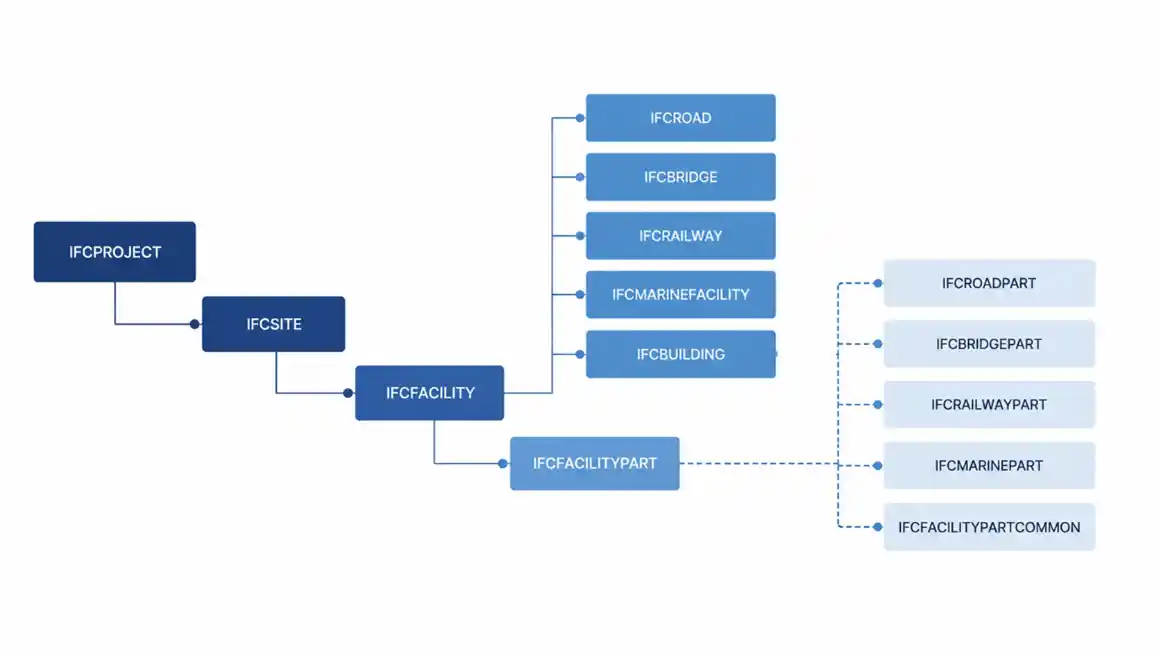
IFC Mapping
Want to ensure your global workflows meet the latest international standards? Read our complete guide on Mastering BIM Deliverables, BEPs, and ISO 19650 Compliance to keep your project data future-proof.
Read NowChallenges of IFC Workflows
Although IFC improves interoperability, it also introduces technical complexities.
Data Translation Loss
During IFC export and import, some BIM intelligence may not transfer perfectly. This is one of the biggest concerns in IFC workflows.
This can include:
- Missing parameters
- Material inconsistencies
- Broken object behavior
- Geometry conversion issues
- Classification mismatches
Autodesk Revit 2026 makes IFC linking up to 50% faster than previous versions, introduces IFC Link Orientation control for mis-aligned coordinate systems, and ships a new IFC Connector currently in public beta. The 2026 release also matures the IFC export category mapping interface, so custom Revit categories and parameters can now be mapped consistently to IFC outputs, significantly reducing the “translation loss” that has historically been IFC’s biggest weakness.
Read NowReduced Editing Flexibility
IFC models are typically less editable than native Revit files. As a result, IFC is often better suited for coordination and data exchange rather than active authoring.
Teams may lose:
- Parametric constraints
- Family intelligence
- Dynamic relationships
- Certain custom properties
More Complex BIM Management
Without proper management, interoperability issues can increase quickly. Successful IFC workflows require:
- Strong BIM standards
- Proper export settings
- Clear naming conventions
- Data validation processes
- Experienced BIM coordinators
Is LOD Dead? The Evolution of Model Development Specifications (MDS)
Read NowWhen Should Teams Use Native Revit?
This approach is best for projects when all the consultants are using the same software, such as Revit. Also, for projects that require rapid design iterations and parametric editing.
- Projects need rapid design iterations.
- Parametric editing is critical.
- Coordination happens within a centralized BIM ecosystem.
- Autodesk integration is important.
When Should Teams Use IFC?
It is especially valuable in global infrastructure and public-sector projects. IFC becomes more suitable when:
- Multiple BIM software platforms are involved.
- Open BIM standards are needed.
- Government mandates specify IFC deliverables.
- Long-term asset management is important.
- International consultants use different systems.
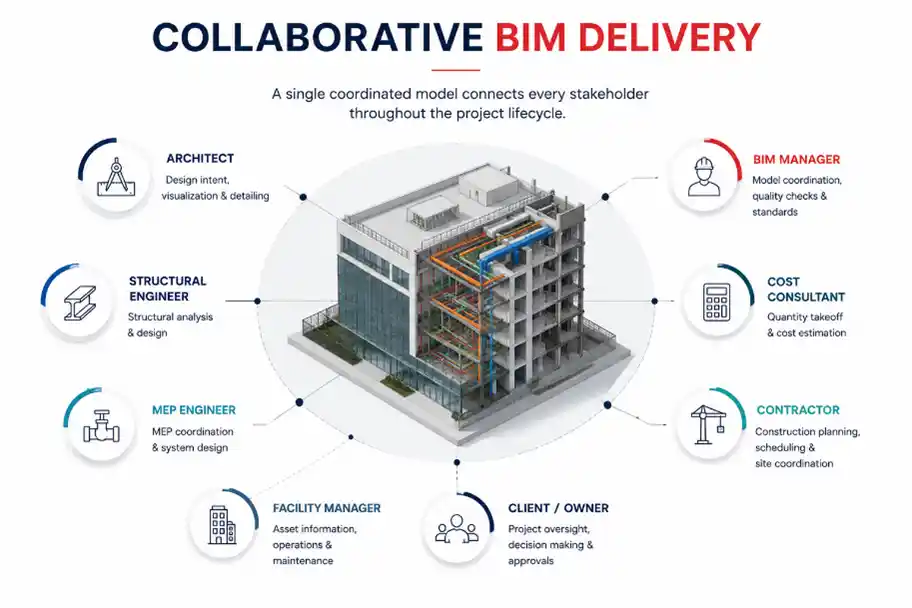
Collaboration In Revit The Rise of Hybrid BIM Workflows
Many advanced BIM teams are working with so-called hybrid workflows. With hybrid workflows the teams are working with the most productive way of working and at the same time fulfill their requirements of interoperability.
A hybrid workflow may involve:
- Native Revit for internal design collaboration
- IFC for external coordination
- Open BIM deliverables for clients
- Native BIM for authoring
- IFC for archives and facility management
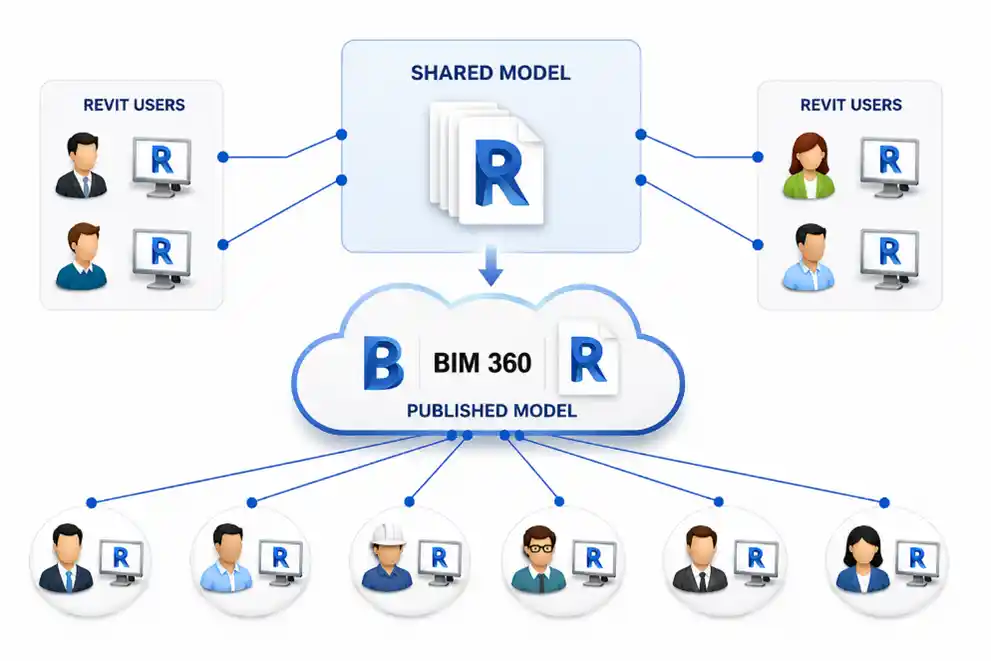
Use of Autodesk BIM 360
The Future of BIM
The future of BIM is going to be more interlinked and will also include digital twins and the management of the site building with AI automation for the coordination and monitoring of the site progress. Interchangeability of data between all the software platforms used within a project will be crucial in eradicating errors, rework and misinformation which causes problems on site due to incorrect information.
The industry is gradually shifting toward:
- Open BIM ecosystems
- Common Data Environments (CDEs)
- Digital twins
- AI-assisted coordination
- Cross-platform BIM collaboration
- Smart infrastructure systems
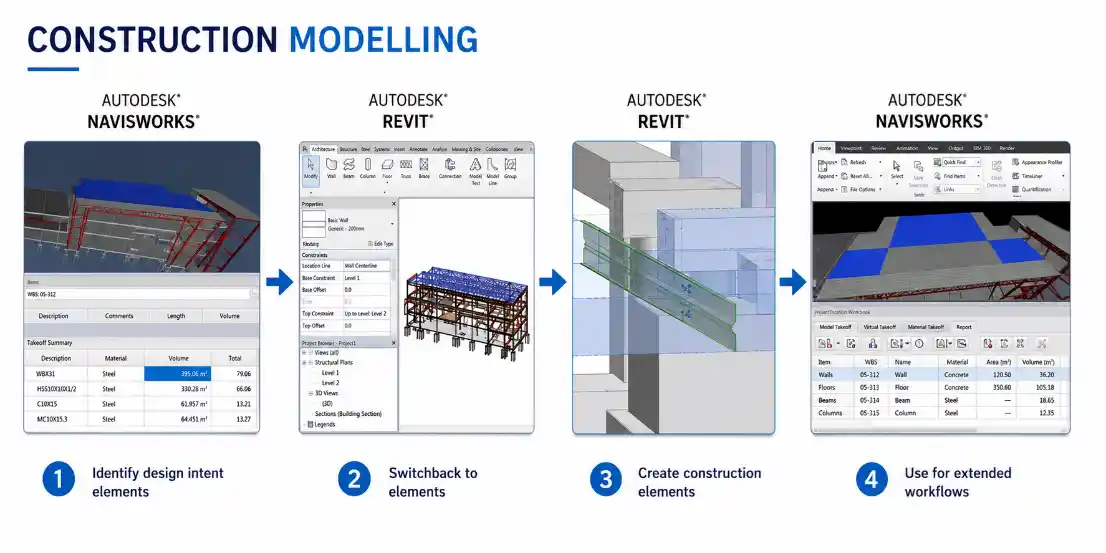
Stages of Construction Modelling
Conclusion
This IFC vs native Revit post will not be another ‘which is better?’ discussion, instead I will be outlining why I think this is a case of ‘there is no one true solution’ and that we need to work out what is best for each project in terms of the interoperability solution that is needed.
Native Revit workflows provide:
- Faster collaboration
- Better editing control
- Strong parametric intelligence
- Seamless Autodesk integration
Meanwhile, IFC offers:
- Open BIM flexibility
- Cross-platform compatibility
- Long-term accessibility
- Better support for international collaboration
Interoperability is not a choice for global construction projects. The use of BIM on such projects is part of effective BIM delivery and future-proof project management. Therefore, the best BIM teams around the world are not deciding whether to use IFCs or go with native functionality of applications such as Revit. They are learning how to make the best of a variety of workflows that can be developed and that can be scaled up to meet the needs of projects. Such teams are developing collaborative, effective and future-proof BIM workflows.